Electronics / Remote Controls
Jiecang JCHR35W28 6-Channel Remote Control User Manual
Quick guide for the Jiecang JCHR35W28 6-channel remote control. Learn how to operate vane adjustments, set channels, use child-lock, and replace batteries.
Quick answers from the manual
Quick answer
- The JCHR35W28 is a 6-channel remote control. It supports vane adjustment, channel selection, and a child-lock feature. It operates on 2 AA batteries with a range of at least 30 meters. p. 1, 2
Key actions
- Activate Child-lock: Press P1 or P2 for 10s, repeat 3 times. p. 2
- Adjust Vanes: Scroll 1 notch to move vanes 1 notch. p. 2
Problems and fixes
Orange LED flickers
Replace batteries.
p. 1Maintenance and reset
- Replace batteries when distance is short or sensitivity is low. p. 1
Technical specifications
| Parameter | Value | Meaning | Pages |
|---|---|---|---|
| Battery | 2 x AA | Power source | p. 1 |
| Frequency | 433.92MHz | Radio frequency | p. 1 |
Where to find it in the PDF
- Product Info and Parameters p. 1
- Instructions p. 2
Table of contents
Quick guide from the manual
This document provides operating instructions for the Jiecang JCHR35W28 6-channel remote control. Key features include vane adjustment, channel selection, and a child-lock function. Users should be aware of battery replacement indicators and environmental limitations.
Product Overview
The remote features a front interface for channel and vane control and a rear battery compartment. It is designed for indoor use with a transmission distance of at least 30 meters.
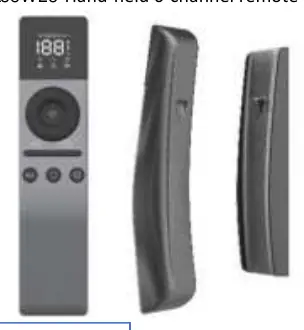
Operating Instructions
Child-lock (Prohibit dual-key operation)
To activate the child-lock, press P1 or P2 for 10 seconds and repeat 3 times. When the child-lock is enabled, limit setting and other programming functions are disabled.
Number of Channels Setting
When all LEDs are lit, the remote is set to channel 0, which allows all channels to move together.
Vane Adjustment
Scroll 1 notch to move the vanes up or down by 1 notch. Scrolling n notches will raise or lower the vanes by n steps.
Maintenance and Safety
- Battery Replacement: When the remote control distance is significantly shorter or less sensitive, check if the battery needs to be replaced.
- Low Battery Indicator: If the orange LED flickers when a button is pressed, the battery voltage is too low and requires replacement.
- Environmental Precautions: Do not expose the transmitter to moisture or impact to ensure longevity.
- Disposal: Dispose of used batteries according to local garbage classification and recycling policies.
Technical Parameters
- Battery Type: 2 x AA batteries
- Working Temperature: -10°C to 50°C
- Radio Frequency: 433.92MHz ±100kHz
- Transmit Distance: ≥30m indoor
Practical help
Common problems
Remote distance is short or sensitivity is low
Check if the batteries need to be replaced.
Orange LED flickers when pressing a button
The battery voltage is too low; replace the batteries immediately.
Cannot perform limit setting or programming
Check if the child-lock (dual-key operation prohibited) is active.
Before use
- Install 2 x AA batteries in the rear compartment.
- Ensure the environment is within the -10°C to 50°C temperature range.
- Verify that the remote is not exposed to moisture or impact.
- Check if the child-lock is enabled if programming functions are unresponsive.
Specs in practice
- Radio Frequency
- 433.92MHz ±100kHz operating frequency for signal transmission.
- Transmit Distance
- Minimum 30 meters range in indoor environments.
- Working Temperature
- Operational range between -10°C and 50°C.
Images and diagrams
- Front view: Displays the 6-channel interface and vane adjustment controls.
- Back view: Indicates the location of the battery compartment.
Model compatibility
- Refer to the motor operation instruction for other operations not covered in this manual.

Manual page author
David Miller
Documentation analyst
Organizes user manual content into clear summaries, with attention to model details, product context, and everyday usability.