Computers / Tablets
User Manual for Jumper Z3 Tablet
Quick guide for the Jumper Z3 tablet. Includes interface layout, technical specifications, safety warnings, and regulatory information.
Table of contents
Manual images
Click an image to enlargeQuick guide from the manual
This document provides essential information for operating the Jumper Z3 tablet. Ensure you use the original charger or a compatible USB 2.0 interface for charging. When using a charger, ensure the adapter is installed near the equipment and is easily accessible. For body-worn operations, maintain a minimum separation distance of 0mm between the device and your body.
Device layout
The tablet features the following interface components:
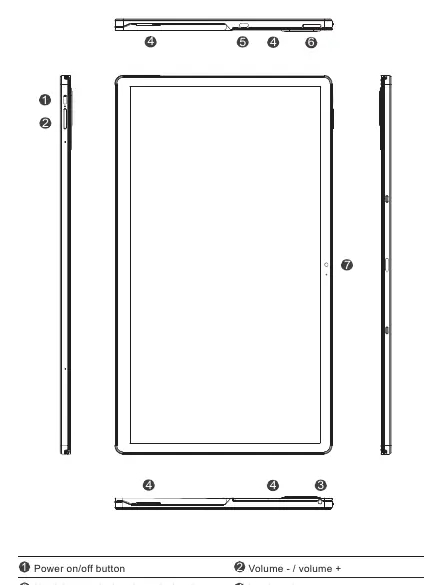
- Power on/off button
- Volume +/- buttons
- Headphone and microphone dual socket
- Loudspeaker
- TYPE-C interface
- TF card / SIM card slot
- Front camera
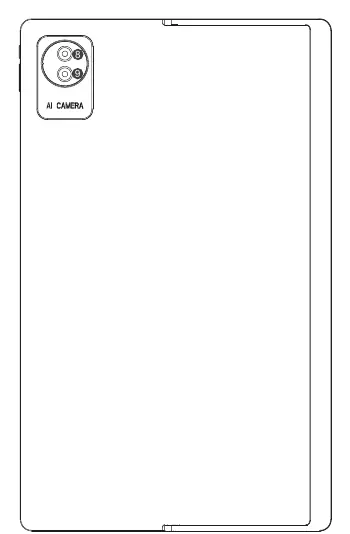
- Rear camera
- Flash lamp
Technical specifications
The Jumper Z3 tablet includes the following hardware specifications:
- System: Android
- Processor: MT8781
- Capacity: 8GB RAM / 256GB Storage
- Screen: 15.4-inch FHD IPS
- Battery: 10000mAh
- Wireless: 2.4G+4G+5G Wi-Fi + BT
- Dimensions: 366 x 222 x 11 mm
- Input: 9V / 2A
Safety and regulatory information
Please observe the following safety precautions:
- Hearing Safety: Use caution with earphones and headphones, as excessive sound pressure can cause hearing loss.
- Battery Safety: Risk of explosion if the battery is replaced by an incorrect type. Dispose of used batteries according to the instructions.
- Operating Temperature: The extreme operating temperature range is -20 to +45°C.
- Regulatory Compliance: This device complies with FCC Part 15 rules and ISED Canada requirements. It is designed for indoor use in the 5150-5350 MHz band to reduce interference.
Practical help
Common problems
Battery replacement
Do not replace the battery with an incorrect type; dispose of used batteries according to the instructions.
Hearing loss risk
Use caution with earphones and headphones due to potential excessive sound pressure.
Radio interference
If interference occurs, reorient or relocate the receiving antenna or increase the separation between the equipment and the receiver.
Before use
- Ensure you use the original charger or a compatible USB 2.0 interface.
- Verify the power adapter is installed near the equipment and is easily accessible.
- Ensure the device is charged before first use.
- Check that the SIM/TF card is correctly inserted if needed.
Specs in practice
- Connectivity
- Supports 2.4G/5G Wi-Fi, 4G, and Bluetooth
Images and diagrams
- The device features a power button and volume controls on the side.
- The Type-C interface is used for charging and data transfer.
- The TF/SIM card slot is located on the side of the device.
- The rear camera and flash lamp are located on the back panel.
Model compatibility
- Compatible with standard EN50332.
- Designed for indoor use in the 5150-5350 MHz band.
- Complies with FCC/ISED SAR limits.

Manual page author
Emily Carter
User documentation editor
Prepares concise manual descriptions and highlights the most useful setup, operation, and maintenance information for readers.