Lighting / Outdoor Lighting
User Manual for Lumi 104151 Series Sensor Light
Quick guide for the Lumi 104151 series security light. Learn how to install, adjust PIR sensor settings (Lux, Time, Sensitivity), and use the manual override function.
Table of contents
Manual images
Click an image to enlargeQuick guide from the manual
This document provides installation and operation instructions for the Lumi security light series (104151, 104246, 104271, 104152). It is recommended that the installation be performed by a qualified electrician to ensure compliance with local building regulations and AS.NZS 3000 standards. Always switch off the mains supply before beginning installation.
Description of operation
The security light features an integrated infrared detector (PIR). It automatically switches on when movement is detected in the surrounding area or when natural daylight fades.
Installation
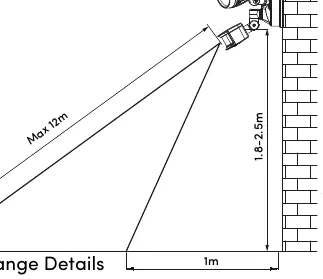
The unit is designed for a 220-240V 50Hz supply. The recommended installation height is between 1.8m and 2.5m. Ensure that any damaged parts are replaced immediately to avoid hazards.
PIR Sensor Function
The sensor can be customized using the three dials located on the unit:
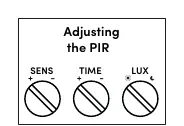
- Lux Control Level: Adjusts the light threshold. Set to the 'sun' position for operation during both day and night. Set to the 'moon' position for night-only operation.
- Duration Time: Sets how long the light stays on after motion is detected. Adjustable from 10 seconds (±3s) to 7 minutes (±3min).
- Sensor Sensitivity: Adjusts the detection distance from 5m (low sensitivity) to 12m (high sensitivity).
Manual Override Function
You can force the light to stay on continuously using the manual override function:
- To activate: Switch the internal wall switch from ON to OFF, then back to ON within 2 seconds. The light will illuminate continuously.
- To return to Auto Mode: Switch the internal wall switch from OFF to ON after 10 seconds.
Specifications
- Input Voltage: AC220-240V
- Wattage: 26W (13W per head) COB
- Detection Range: 160° max
- Detection Distance: 12m max (<24°C)
- IP Rating: IP54
- Color: Black / Silver
Official resources from the manual
Practical help
Common problems
Light does not turn on
Check if the LUX setting is set to 'moon' (night only) while it is still daylight. Adjust to 'sun' to test during the day.
Light stays on too long
Adjust the TIME dial to a shorter duration (minimum 10 seconds).
Sensor not detecting movement
Increase the SENS dial setting to improve sensitivity or check if the installation height is within the 1.8m-2.5m range.
Before use
- Ensure mains power is switched off before installation.
- Verify installation height is between 1.8m and 2.5m.
- Ensure installation complies with AS.NZS 3000 regulations.
- Check that the external flexible cable is undamaged.
Images and diagrams
- Adjusting the PIR: Shows the three dials (SENS, TIME, LUX) used to customize sensor behavior.
- PIR Range Details: Illustrates the 160-degree detection angle and the 12m maximum detection distance.
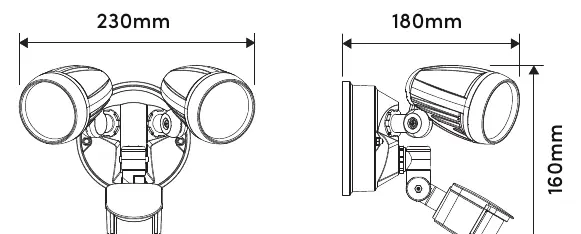
- Dimensions: Provides the physical dimensions (230mm width, 180mm depth, 160mm height) for mounting planning.
Model compatibility
- Designed for connection to a 220-240V 50Hz supply.
- Installation must comply with AS.NZS 3000.

Manual page author
David Miller
Documentation analyst
Organizes user manual content into clear summaries, with attention to model details, product context, and everyday usability.