Home Appliances / Hand Dryers
User Manual for Sanela SLO 03C / SLO 03L Automatic Hand Dryer
Comprehensive user guide for the Sanela SLO 03C and SLO 03L automatic hand dryers. Includes installation instructions, maintenance procedures, parameter settings, and troubleshooting tips.
Table of contents
Manual images
Click an image to enlargeImportant Information
The Sanela SLO 03C and SLO 03L are automatic wall-mounted hand dryers. Installation must be performed by a qualified person in compliance with standard CEI-64-8/7. The unit must be connected to a constant voltage source and not behind a light switch circuit to ensure proper operation. The dryer is equipped with an EPA filter, UV disinfection, and adjustable settings for heating, air flow, and sensor sensitivity.
Installation
The dryer should be installed at least 120 cm from the ground (measured from the air outlet) and at least 40 cm away from reflecting surfaces like washbasins to prevent incorrect sensor triggering. Ensure the electrical system capacity matches the dryer's maximum power.
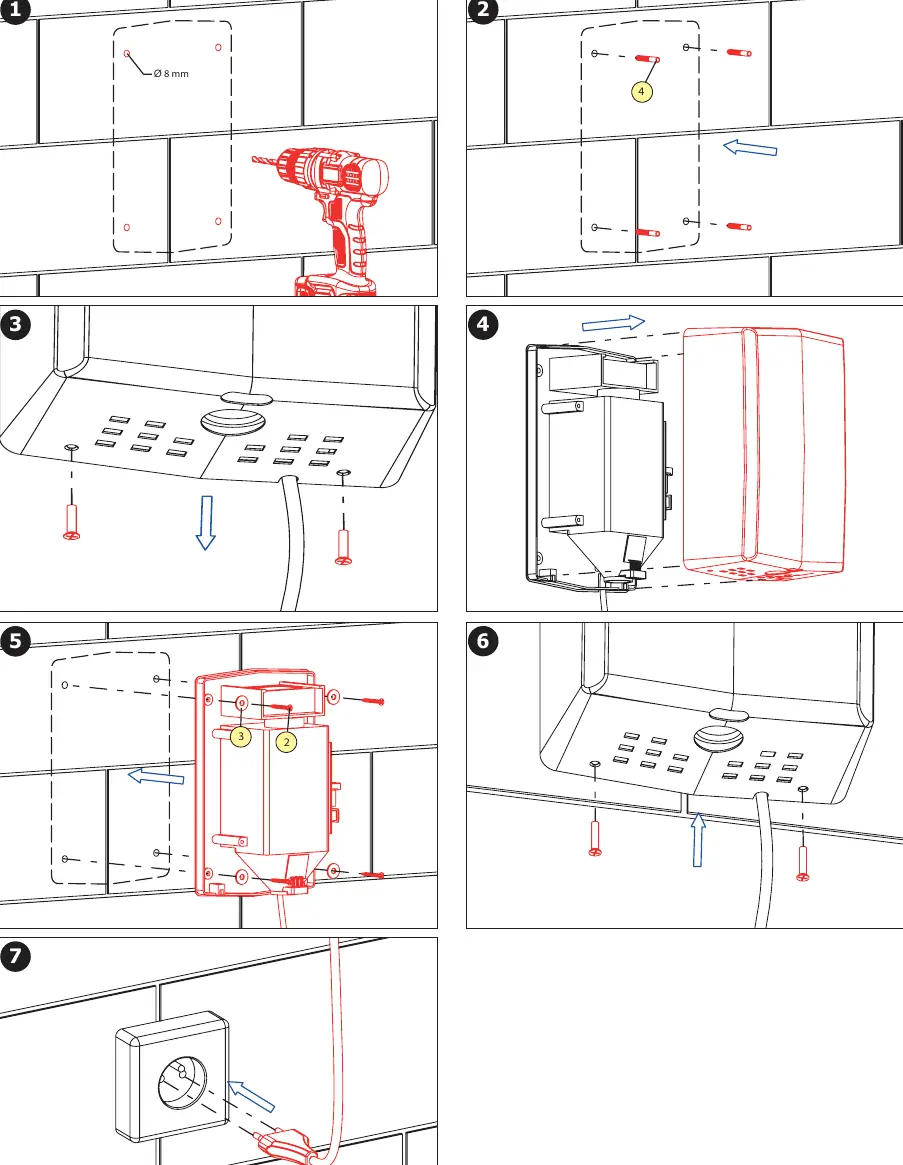
Wall Mounting
- Mark the drilling points on the wall using the provided template.
- Drill holes (8 mm diameter) and insert wall plugs.
- Secure the base to the wall using the provided screws.
- Attach the cover to the base.
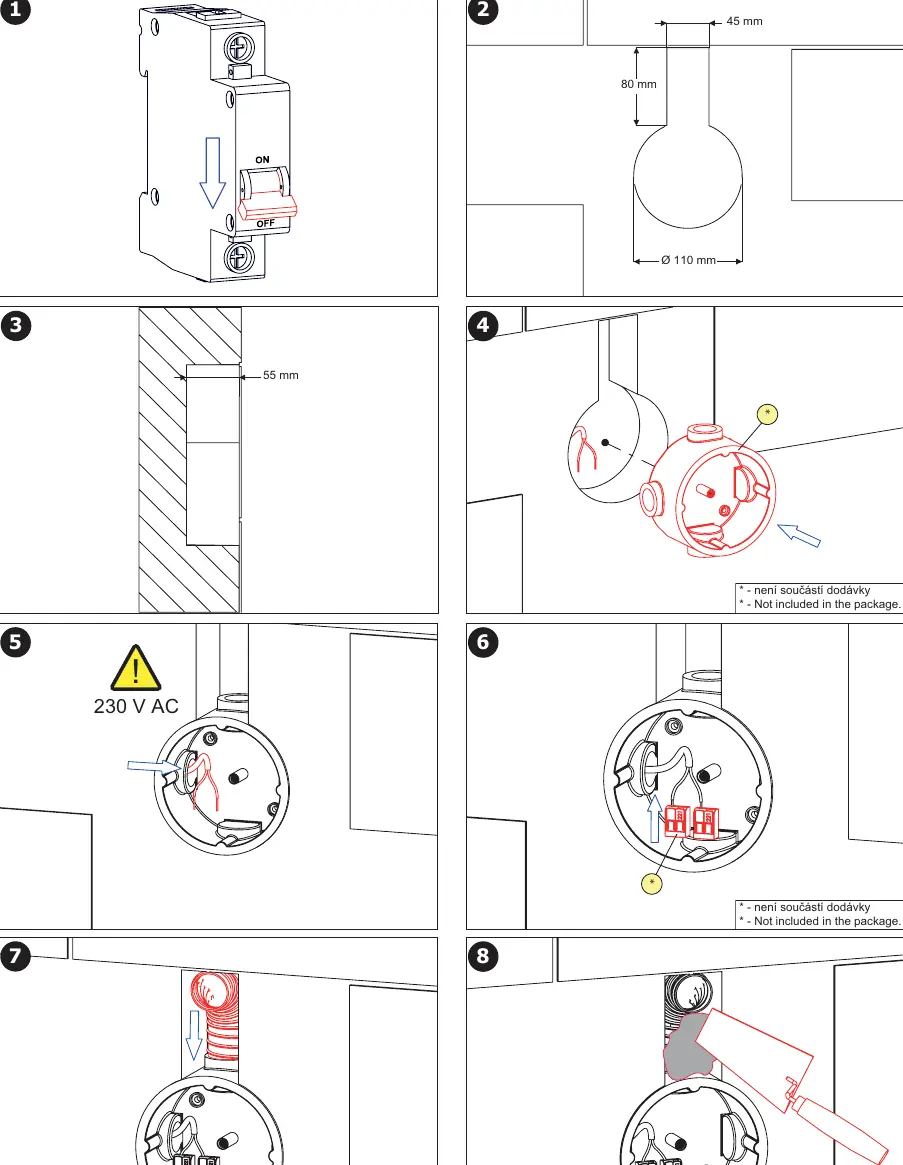
Electrical Connection
The unit can be connected via a standard plug or direct wiring. Ensure the power supply is constant. Do not connect the power supply unit behind a switch in a light circuit.
Operation
The hand dryer starts and stops automatically when hands approach or move away from the air outlet. If the internal temperature exceeds the limit, a thermostat with automatic reset will temporarily suspend motor operation for safety.
Parameters Setting
The device features internal controls located on the electronic board:
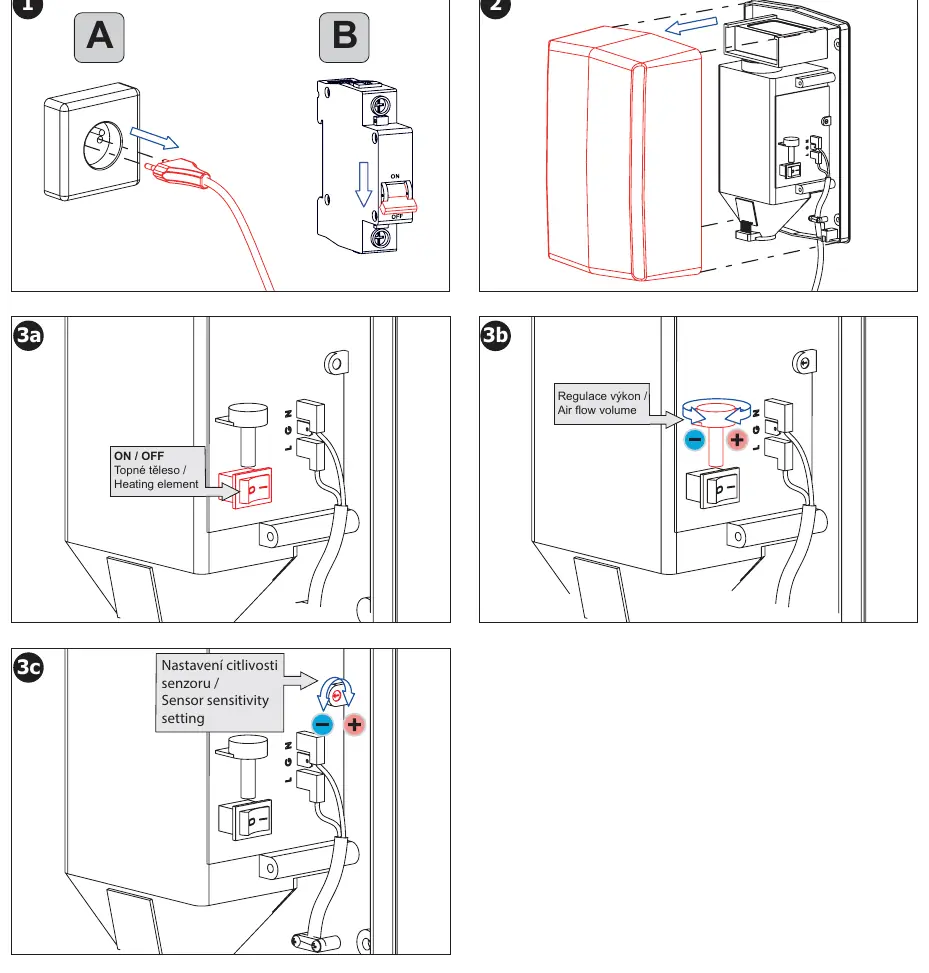
- Heating Element: Can be switched ON or OFF to save energy.
- Air Flow Volume: Adjustable via the variator (turning anticlockwise decreases power/noise, clockwise increases power).
- Sensor Sensitivity: Adjustable via the sensitivity setting control.
Maintenance
Disconnect the power supply before performing any maintenance. Clean the exterior with a soft cloth dampened with water and detergent. Periodically check that air inlet and outlet grids are not clogged.
Filter Maintenance
The EPA E11 filter removes dust and dirt. It must be cleaned periodically with compressed air (from approx. 20 cm distance) and replaced after a maximum of 1000 hours of use, along with the motor brush cartridges. Failure to clean the filter may cause motor fatigue and failure.
Troubleshooting
If the dryer stops after approximately 60 seconds, it is likely due to the photocell being blocked (e.g., by an object). Remove the obstruction; the dryer will resume normal function in 3-4 seconds. If the unit does not operate, verify the power connection and ensure it is not connected to a switched light circuit.
Manufacturer information
SANELA spol. s r. o.
Practical help
Common problems
Dryer stops after 60 seconds
The sensor is likely blocked by an object. Remove the object; the dryer will resume normal operation in 3-4 seconds.
Air feels cold
The heating element may be switched off. Check the internal switch on the electronic board.
Dryer does not work
Ensure the unit is connected to a constant voltage source and not behind a light switch circuit.
Before use
- Ensure installation is performed by a qualified person.
- Verify electrical system matches the dryer's power requirements.
- Install at least 120 cm from the ground.
- Maintain at least 40 cm distance from reflecting surfaces (e.g., washbasin).
- Ensure the unit is connected to constant voltage.
Specs in practice
- Protection Level
- IP 23
- EPA Filter Lifetime
- 1000 hours
Images and diagrams
- Installation A: Standard wall mounting procedure.
- Installation B: Wiring connection details.
- Parameters Setting: Location of internal switches for heating, air flow, and sensor sensitivity.
Model compatibility
- Not intended for use by persons with reduced physical, sensory, or mental capabilities without supervision.
- Children under 8 years must be supervised.

Manual page author
David Miller
Documentation analyst
Organizes user manual content into clear summaries, with attention to model details, product context, and everyday usability.