Industrial / Access Control
User Manual for Security Brands 14-500T Keypad
Quick start guide and programming manual for the Security Brands 14-500T Ridge 2.0 wireless keypad. Includes installation, wiring diagrams, programming codes, and reset procedures.
Table of contents
Manual images
Click an image to enlargeQuick Guide
The Security Brands 14-500T Ridge 2.0 is a wireless keypad system. The default Master Code is 1251. The receiver is not weatherproof and must be installed inside a weatherproof enclosure. Always ensure the gate path is clear before operating.
Installation
Keypad Mounting: Unlock and remove the front panel of the keypad unit. Use the included carriage bolts and hex nuts to attach the unit to a pedestal.
Receiver Mounting: Attach the receiver to the inside wall or surface of the gate operator using Tek screws, zip ties, or the included adhesive mounting pad.
Wiring
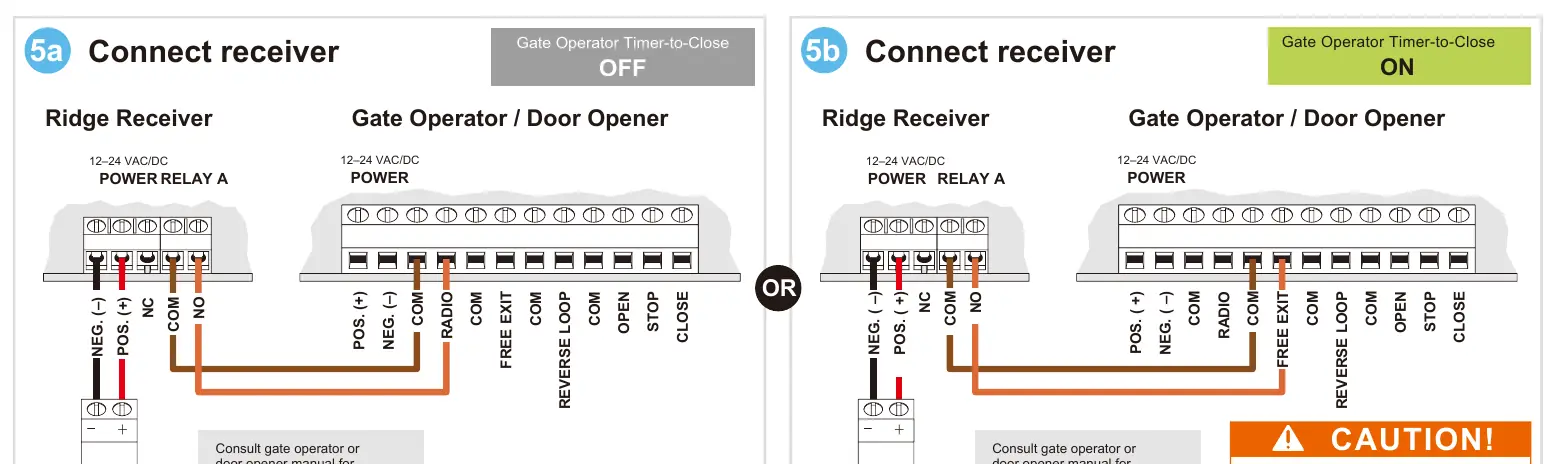
The receiver connects to the gate operator via the connection terminals. It requires a 12-24 VAC/DC power source. Consult your gate operator or door opener manual for exact terminal connections, as they vary by manufacturer.
Programming
Programming is performed using the keypad. The general sequence is: Master Code (1251) -> Sub Mode -> Action.

- Pairing: Remove receiver cover, hold Programming button for 3 seconds. Enter 1-2-5-1-9-Channel(1 or 2)-* on the keypad.
- Add Access Code: Enter 1-2-5-1-1-Access Code-#.
- Delete Code: Enter 1-2-5-1-2-Code to Delete-#.
- Set Relay Time: Enter 1-2-5-1-6-Channel-Seconds-#.
Reset Procedures
If the Master Code is forgotten or the unit needs to be reset, use the following procedures:
Master Reset
Used if the Master Code is unknown. All other codes are retained.
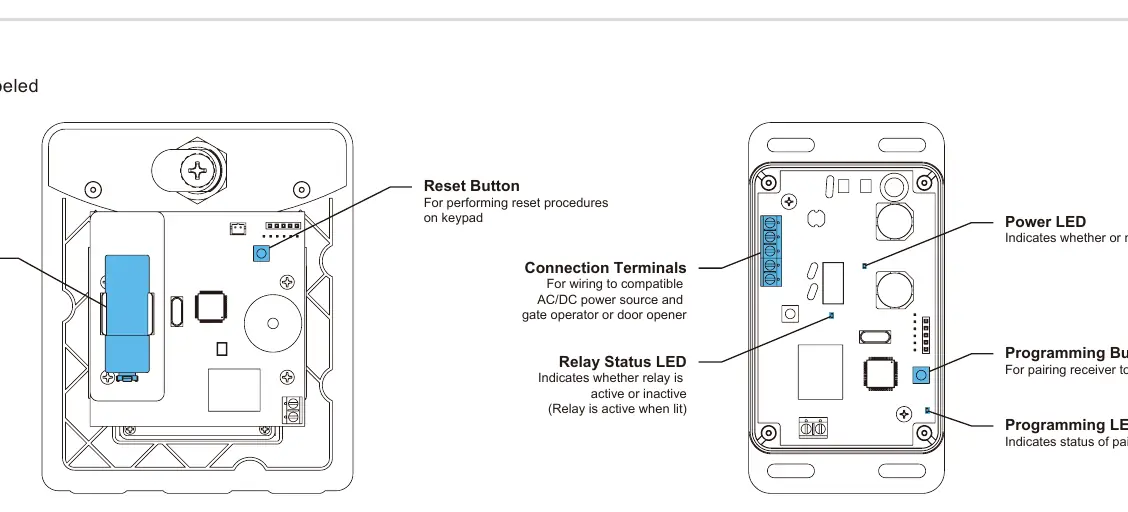
- Remove front panel and disconnect battery.
- Press and hold Reset Button, reconnect battery, then release Reset Button.
- Press Star key (*) three times.
- Reattach front panel. The Master Code is now 1251.
Unit Reset
Used to reset to factory defaults. Warning: This deletes all codes except the Master Code.
- Remove front panel and disconnect battery.
- Press and hold Reset Button, reconnect battery, then release Reset Button.
- Enter Pound (#) - Star (*) - Pound (#).
- Enter 1251 (Master Code).
- While the unit beeps, disconnect and reconnect the battery.
Support
For technical support, call 972-474-6390 or email [email protected]. Support is available Monday through Friday, 8am-5pm Central.
Manufacturer information
Security Brands, Inc.
Practical help
Common problems
Keypad locks up
Repeat the pairing process (Step 6).
Receiver not working
Ensure the receiver is mounted inside a weatherproof enclosure and check power connections (12-24 VAC/DC).
Forgot Master Code
Perform the Master Reset procedure to reset the code to 1251.
Before use
- Unpack all items: Keypad, Receiver, 9V Battery, Hardware.
- Ensure receiver is mounted inside a weatherproof enclosure.
- Install the 9V battery into the keypad.
- Verify gate operator power source (12-24 VAC/DC).
- Ensure gate path is clear before testing.
Specs in practice
- Relay Status LED
- Indicates if the relay is active (lit) or inactive.
Images and diagrams
- Wiring diagram shows connection between Ridge Receiver and Gate Operator terminals.
- Keypad components diagram shows battery installation and reset button location.
Model compatibility
- Receiver is not weatherproof; must be mounted inside an enclosure.
- Compatible with 12-24 VAC/DC power sources.

Manual page author
Michael Turner
Technical manual editor
Reviews PDF manuals for structure, safety notes, and practical product details so readers can find the right information quickly.