Industrial / Access Control
Quick Start Guide for Security Brands 14-RTE300 Request to Exit Station
Quick start guide for the Security Brands 14-RTE300 Request to Exit Station. Includes installation steps, DIP switch pairing instructions, and compatibility requirements for 300-MHz receivers.
Table of contents
Manual images
Click an image to enlargeQuick guide from the manual
This document provides the installation and setup procedure for the Security Brands 14-RTE300 Request to Exit Station. This device is a wireless transmitter designed to trigger gate or door openers. It requires a compatible 300-MHz receiver with 10 DIP switches to function.
What is in the box
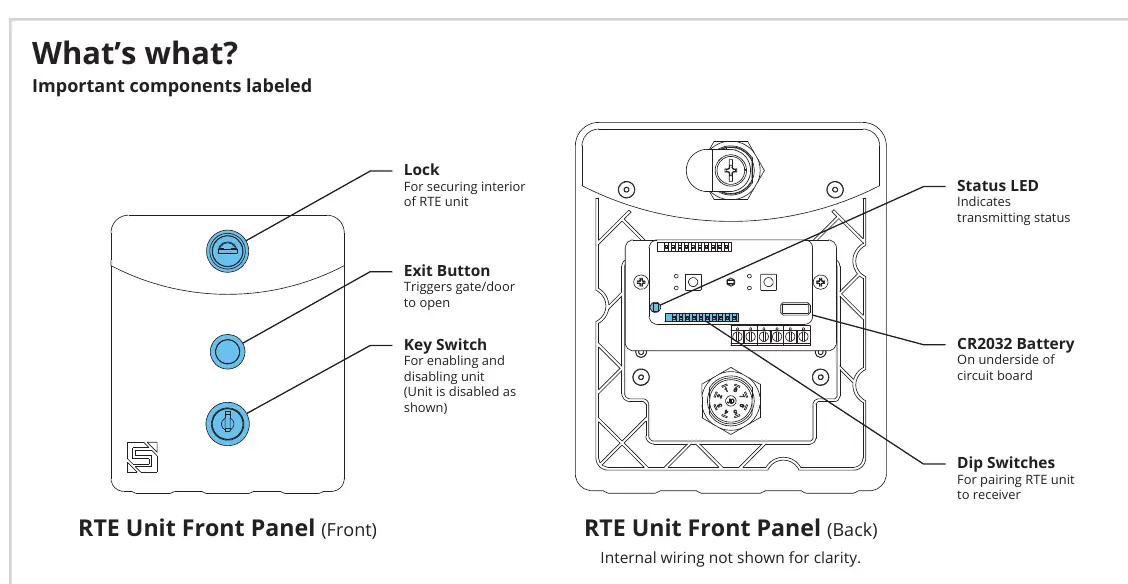
- RTE Unit
- Key Switch Keys
- Lock Key
- 4x Carriage Bolts
- 4x Hex Nuts
- Hole Plug
Installation
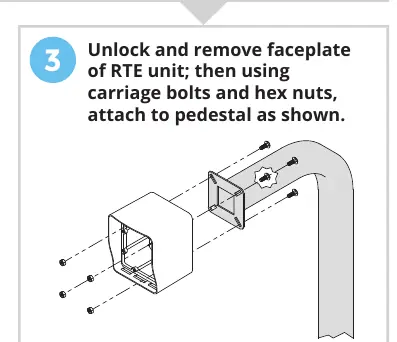
- Unpack: Carefully unpack the box and verify all components are present.
- Mounting: Unlock and remove the faceplate of the RTE unit. Use the provided carriage bolts and hex nuts to attach the unit to the pedestal.
Pairing with receiver
- Locate Receiver: Find the receiver (not included), typically installed inside the gate operator housing, and open it to access the DIP switches.
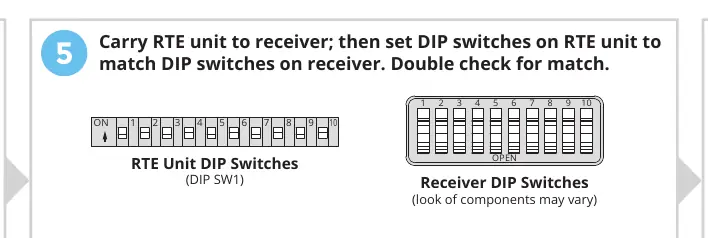
- Set DIP Switches: Carry the RTE unit to the receiver. Set the DIP switches on the RTE unit (DIP SW1) to match the DIP switches on the receiver exactly.
- Verify: Double-check that the switch positions match. Note that 'OPEN' on the receiver usually corresponds to 'OFF' (blank) on the RTE unit.
Operation and settings
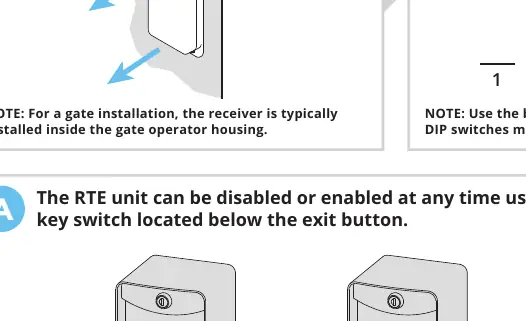
The RTE unit features a key switch located below the exit button. This switch allows you to enable or disable the unit at any time. When the unit is disabled, the exit button will not trigger the gate.
Compatibility and safety
Important: The 14-RTE300 is compatible ONLY with 300-MHz receivers that use 10 DIP switches (e.g., Digi-Code or Multi-Code brands). It will not work with other receiver types.
Warning: Automatic gates can cause serious injury or death. Always ensure the gate path is clear before operating. Reversing or other safety devices should always be used.
Support
If you need assistance, you can contact Security Brands Inc. at (972) 474-6390 or via email at [email protected]. Support is available Monday through Friday, 8am to 5pm Central.
Manufacturer information
Security Brands, Inc.
Practical help
Common problems
Gate does not open when button is pressed
Ensure the unit is enabled using the key switch. Verify that the DIP switch settings on the RTE unit match the receiver exactly.
Unit is not working with receiver
Confirm that your receiver is a 300-MHz model that uses 10 DIP switches. This unit is not compatible with other receiver types.
Before use
- Ensure you have a 300-MHz receiver with 10 DIP switches.
- Verify the gate path is clear of obstructions.
- Ensure the CR2032 battery is installed correctly.
- Have a screwdriver available for installation.
- Check that the key switch is in the 'enabled' position.
Specs in practice
- DIP Switches
- 10-switch configuration used for pairing with the receiver.
Model compatibility
- Compatible ONLY with 300-MHz receivers using 10 DIP switches.
- Includes compatibility with Digi-Code or Multi-Code brands.
- Will not work with receivers that do not use 10 DIP switches.

Manual page author
Emily Carter
User documentation editor
Prepares concise manual descriptions and highlights the most useful setup, operation, and maintenance information for readers.