Industrial / Access Control
Security Brands Ascent X2 Multi-Tenant Entry System Installation
Quick installation guide for the Security Brands Ascent X2 multi-tenant entry system. Includes wiring diagrams, mounting instructions, and setup steps.
Table of contents
Manual images
Click an image to enlargeQuick guide from the manual
The Security Brands Ascent X2 is a cellular accessory for gates and doors. Important: The unit will not function until the activation process is complete. Always ensure the gate path is clear before operating. An emergency egress mechanism should always be installed alongside this unit.
Unpacking and mounting
Ensure all items are present: Ascent Unit, 12-V AC/DC Adapter, Key, 4 Carriage Bolts, 4 Hex Nuts, and a Screwdriver.
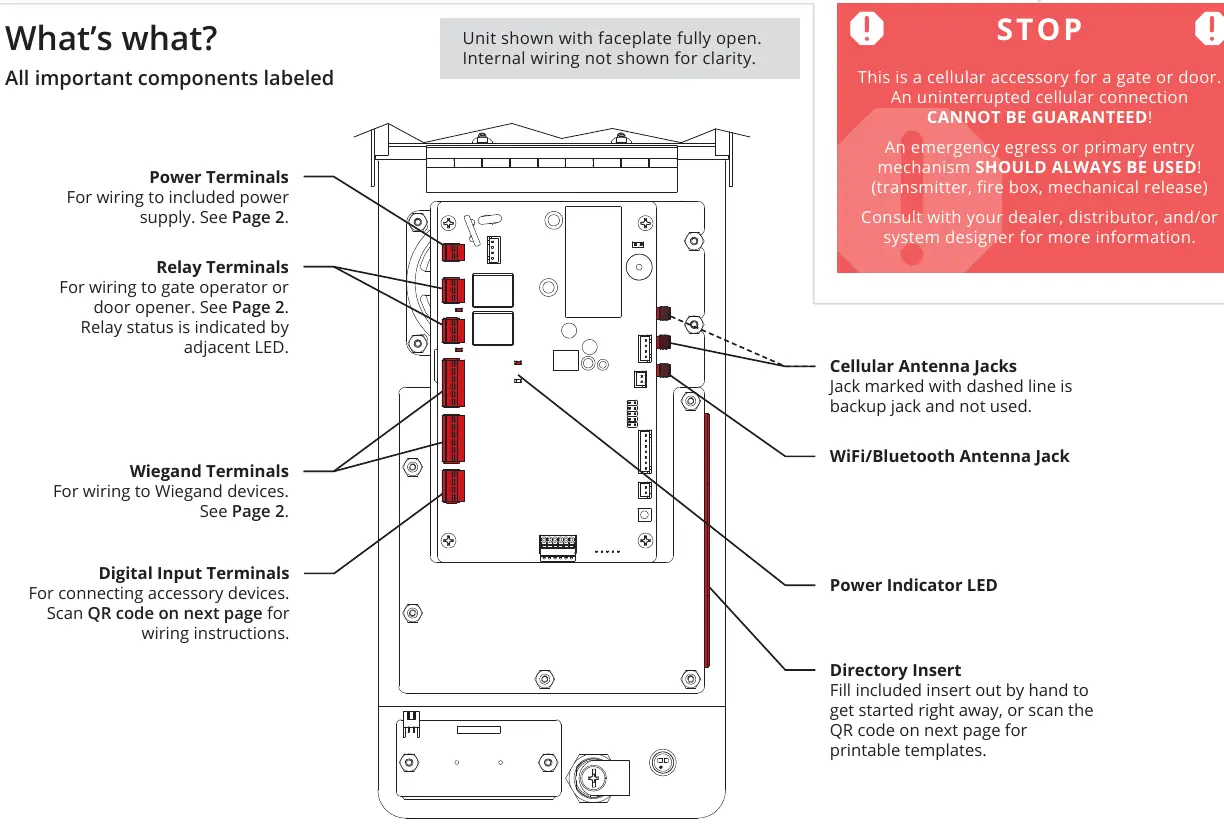
- Mounting: It is recommended to mount the unit on a gooseneck pedestal using the included hardware. Use all four carriage bolts.
- Antenna: Leave the 'hockey puck' antenna in place, even if using an antenna extension.
- Alternative Mounting: If not using a standard pedestal, the 4G LTE Antenna Extension Kit (Model 16-ANTX-1) must be purchased and installed to avoid signal loss.
- Sealing: Seal all openings created in the enclosure to prevent damage.
Wiring overview
The unit features terminals for power, relays, and Wiegand devices. It is recommended to use 18-gauge stranded wire for all connections.
Power and relay connections
Feed wires through the back of the unit. Terminals can be unplugged to make connections easier.
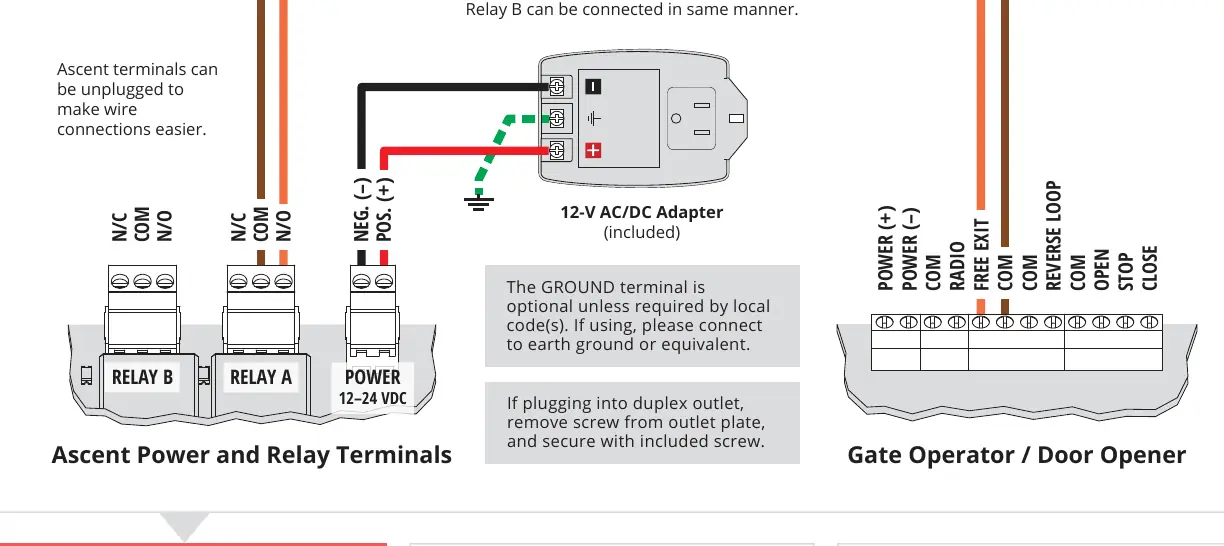
- Power: Connect to the 12-V AC/DC adapter. Ensure positive is connected to positive and negative to negative. Reversing polarity can damage the unit and void the warranty.
- Relays: Connect to the gate operator or door opener. Consult the gate operator manual for specific terminal connections.
- Ground: The ground terminal is optional unless required by local codes.
Wiegand device connection
The unit supports Wiegand devices such as card readers or keypads.
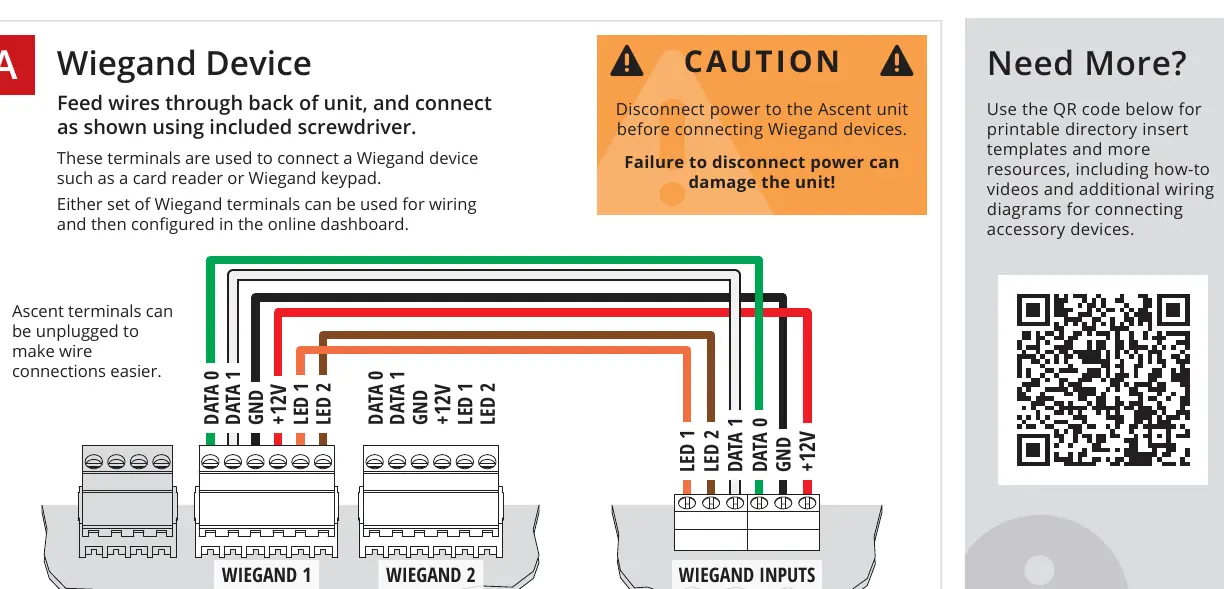
- Safety: Disconnect power to the Ascent unit before connecting Wiegand devices.
- Wiring: Connect the device wires to the Wiegand 1 or Wiegand 2 terminals as shown in the wiring diagram.
- Configuration: Once wired, the device can be configured via the online dashboard.
Initial setup and testing
- Double-check all wiring and ensure the unit has power.
- Unlock and open the unit faceplate.
- Key in the temporary code 2012 on the keypad.
- Confirm the gate opens. If successful, close and lock the faceplate.
- Follow the Activation Guide to create an account and begin using the system.
Note: Adding codes is done via the online dashboard and cannot be performed using the keypad on the unit.
Manufacturer information
Security Brands, Inc.
Practical help
Common problems
Unit not working
The activation process must be complete before the unit will function.
No signal
Ensure the 'hockey puck' antenna is in place. If using alternate mounting, the 4G LTE Antenna Extension Kit (Model 16-ANTX-1) is required.
Wiring damage
Always disconnect power to the unit before connecting Wiegand devices.
Power supply damage
Ensure correct polarity (positive to positive, negative to negative) when connecting the power supply.
Before use
- Unpack all items: Ascent Unit, adapter, key, bolts, nuts, and screwdriver.
- Ensure the gate path is clear.
- Have 18-gauge stranded wire ready for connections.
- Verify power supply requirements (12-24 VDC).
- Ensure an emergency egress mechanism is installed.
Specs in practice
- 18-gauge stranded wire
- Recommended wire type for all connections to ensure reliability.
Images and diagrams
- Power and Relay Terminals: Shows the connection points for the 12-V adapter and gate operator.
- Wiegand Terminals: Shows the connection points for Wiegand devices like card readers or keypads.
Model compatibility
- Requires 12-24 VDC power.
- Compatible with Wiegand devices (card readers/keypads).
- Requires 4G LTE Antenna Extension Kit (16-ANTX-1) for non-pedestal mounting.

Manual page author
Michael Turner
Technical manual editor
Reviews PDF manuals for structure, safety notes, and practical product details so readers can find the right information quickly.