Power / Portable Power Stations
User Manual for Sherpa BASE 2.0-EB Portable Power Station
Quick guide for the Sherpa BASE 2.0-EB portable power station. Includes setup, charging instructions (solar/vehicle), cascading, troubleshooting fault codes, and maintenance tips.
Quick answers from the manual
Quick answer
- The Sherpa BASE 2.0-EB is a 2048Wh LiFePO4 portable power station. It supports solar, vehicle, and AC charging, and can be cascaded with extra batteries. Power it on by long-pressing the main power button. p. 1, 4, 6
Key actions
- Powering ON/OFF p. 6
- Solar Charging p. 7
- Cascading p. 9
First start
- Long press the main power button to turn the unit ON. p. 6
Problems and fixes
E007: PV input over/low voltage
Check Voc of panel setup; it will recover automatically when in range.
p. 11
E008: 12V 30A overload
Remove load and reset DC output using DC ON/OFF button.
p. 11Error codes
| Code | Meaning | Action | Pages |
|---|---|---|---|
| E007 | PV input over-voltage and low voltage protection | Check Voc of panel setup. | p. 11 |
| E020 | BMS communication failure | Call support for help. | p. 11 |
Maintenance and reset
- Long-term storage maintenance p. 11
Technical specifications
| Parameter | Value | Meaning | Pages |
|---|---|---|---|
| Rated Capacity | 2048Wh | Total energy storage | p. 4 |
| Battery Type | LiFePO4 | Lithium Iron Phosphate | p. 4 |
| PV Input | 12-150V DC | Solar input voltage range | p. 4 |
Where to find it in the PDF
- Product Specifications p. 4
- Troubleshooting p. 11, 12
Table of contents
Manual images
Click an image to enlargeQuick guide from the manual
The Sherpa BASE 2.0-EB is a high-capacity portable power station. Before first use, ensure the unit is fully charged. To power the unit ON, long-press the main power button. The unit features multiple output ports, including USB-A, USB-C, and Anderson ports. It supports solar charging (12-150V) and vehicle charging. For long-term storage, discharge to 30% and recharge to 60% every three months.
Product Overview
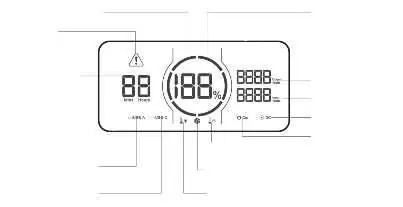
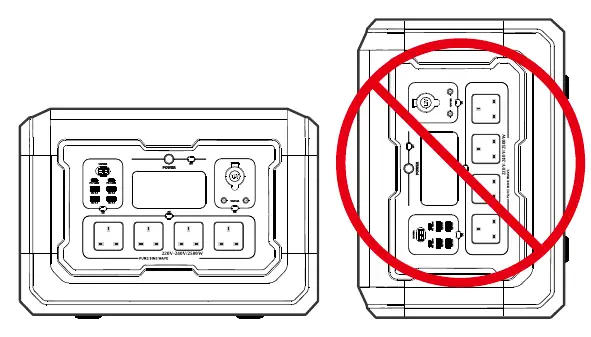
The front panel contains the LCD screen, main power button, and various output ports. The side panels house the Anderson input port and extra battery cascade port. Refer to the function overview diagram for specific port locations.
Operation
Powering ON/OFF: Long-press the main power button to turn the unit ON. Press and hold for at least 3 seconds to turn it OFF. The display will enter sleep mode after 5 minutes of inactivity.
Selecting Outputs: With the unit powered ON, quick-press the DC buttons on the desired panels to activate the outputs.
Charging
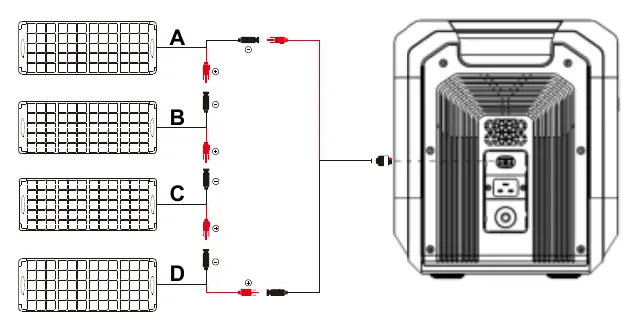
Solar Charging: Connect solar panels to the Anderson input using the supplied cable. Ensure the input voltage is within the 12-150V range. Do not exceed the 150V Voc limit.
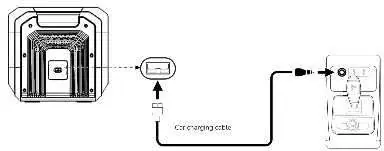
Vehicle Charging: Use the 12V auxiliary car charger port. Start the vehicle engine before connecting the cable to prevent draining the starter battery.
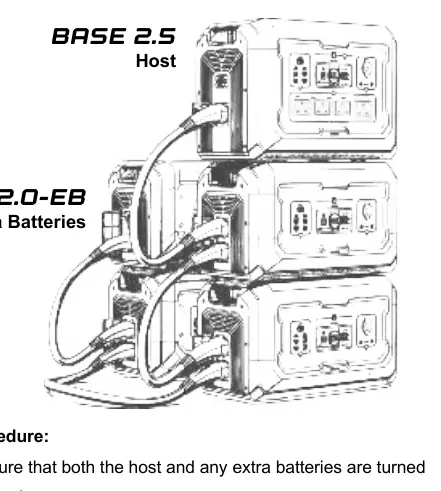
Cascading: Up to 15 extra BASE 2.0-EB units can be connected to a BASE 2.5 host. Ensure all units are OFF before connecting link cables.
Storage and Maintenance
Store in a dry, ventilated place at room temperature (20-30°C). Avoid extreme temperatures (above 45°C or below -10°C). For long-term storage, discharge to 30% and recharge to 60% every three months to maintain battery health.
Practical help
Common problems
No solar charging
Check the Voc of your solar panel setup using a voltmeter. Ensure it is within the 12-150V range.
DC output not working
Check for overload or short circuit. Remove the load and reset the DC output using the DC ON/OFF button.
Unit not charging
Check for temperature protection (too hot or too cold). Allow the unit to reach a safe operating temperature.
Before use
- Read the user manual thoroughly.
- Ensure the unit is fully charged before first use.
- Verify solar panel voltage is within 12-150V range.
- Start vehicle engine before connecting car charger.
- Ensure all units are OFF before connecting cascade cables.
Specs in practice
- Rated Capacity: 2048Wh
- The total energy storage capacity of the battery.
- Battery Type: LiFePO4
- Lithium Iron Phosphate battery, known for safety and long cycle life.
- PV Input: 12-150V DC
- The acceptable voltage range for solar panel input.
Images and diagrams
- Function Overview: Identifies all ports, buttons, and the LCD screen.
- Solar Configuration: Illustrates how to connect solar panels in series/parallel.
- Cascading: Shows the connection method for linking extra batteries to a host unit.
Model compatibility
- Compatible with BASE 2.5 and BASE 3.6 for cascading.
- Solar panels must be within 12-150V range.

Manual page author
Emily Carter
User documentation editor
Prepares concise manual descriptions and highlights the most useful setup, operation, and maintenance information for readers.