Power / Portable Power Stations
User Manual for Sherpa PEAK 2.2 Portable Power Station
Comprehensive user guide for the Sherpa PEAK 2.2 portable power station. Includes setup instructions, charging configurations, UPS mode, settings, and safety guidelines.
Quick answers from the manual
Quick answer
- The Sherpa PEAK 2.2 is a 1536Wh portable power station with a 2200W AC output. It features UPS functionality, dual MPPT charge controllers for solar input, and is cascadable with Peak 3.0-EB batteries. p. 1, 4, 5
Key actions
- Turn on DC/USB/Wireless p. 6
- Turn on AC p. 6
- Enter Settings p. 7
Problems and fixes
AC Overload
Reduce load to under 2200W.
p. 6
Temperature Alarm
Allow unit to cool; ensure ventilation.
p. 6Maintenance and reset
- WiFi Reset p. 8
Technical specifications
| Parameter | Value | Meaning | Pages |
|---|---|---|---|
| Capacity | 1536Wh | Total energy storage | p. 4 |
| AC Output | 2200W | Rated power | p. 4 |
| Weight | 18kg | Net weight | p. 4 |
Where to find it in the PDF
- Box Contents p. 3
- Specifications p. 4
- Function Overview p. 5
Table of contents
Quick Guide
The Sherpa PEAK 2.2 is a high-capacity portable power station designed for off-grid power and emergency backup. Before using the device, ensure the battery is charged and the unit is placed in a well-ventilated area. Always verify that your connected devices do not exceed the 2200W AC output limit.
Function Overview
The front panel features various ports and controls:
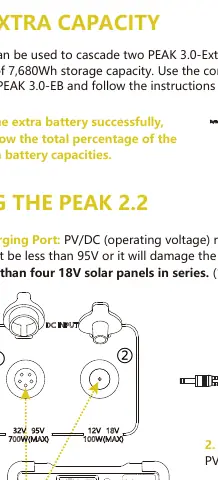
- LCD Display: Shows input/output wattage, battery percentage, and status icons.
- Charging Ports: Includes a 32V-95V port (GX16MF) and a 12V-18V port (5521).
- AC Output: Two AC outlets providing 220V-240V pure sine wave power.
- DC Outputs: Includes XT60, 12V auxiliary, and 12V (5525) ports.
- USB Ports: Multiple USB-A and USB-C ports for device charging.
- Wireless Charger: Located on top of the unit.
Charging the PEAK 2.2
The unit can be charged via several methods:
- Wall Charger: Approximately 1.8 hours.
- Electric Generator: Approximately 1.8 hours (use a voltage regulator).
- Car Charger: Approximately 18 hours via aux port.
- Solar Charging: Supports 32V-95V, 15A PV charging up to 700W. Charging time varies based on wattage (e.g., 3.5-4 hours for 600W).
Solar Configuration Caution: Do not wire more than two 36V solar panels in series, or more than four 18V solar panels in series. Exceeding 95V on the GX16MF port will damage the MPPT controller.
Adjusting Settings
To enter the settings menu:
- Power on the unit.
- Long-press the AC and DC switches simultaneously until the battery symbol flashes.
- Long-press the DC button to enter the settings menu.
- Use the DC button to cycle through options and the AC button to confirm/advance.
Available Settings:
- 001: AC output frequency (50Hz/60Hz).
- 002: AC output voltage (220V/230V).
- 003: No-load auto shut-off timer.
- 004: WiFi reset function.
Short press AC to confirm and save settings (display will show EEP).
UPS Mode
The PEAK 2.2 supports UPS functionality with an 8-20ms switchover time. It is suitable for computers and telecommunication equipment but is not recommended for servers or workstations requiring transfer times under 8ms. Ensure the total load is under 2200W.
Safety and Maintenance
- Storage: Store in a dry, ventilated place at room temperature. For long-term storage, discharge to 30% every three months and recharge to 60%.
- Waterproofing: The unit is IP20 rated and is NOT waterproof. Keep away from liquids.
- Ventilation: Ensure adequate space for vent fans to dissipate heat.
- Disposal: Do not dispose of in general waste; follow local battery recycling regulations.
Practical help
Common problems
AC output shuts off automatically
The device load exceeds 2200W. Reduce the load or check for short circuits.
Overheating alarm
Ensure the unit is in a well-ventilated area and the air vents are not blocked.
Solar charging not working
Verify the solar panel voltage (Voc) is within the 32V-95V range for the GX16MF port or 12V-18V for the 5521 port.
Before use
- Check battery level on the LCD display.
- Ensure all air vents are clear of obstructions.
- Verify that the total power consumption of connected devices is under 2200W.
- Ensure the unit is placed on a stable, dry surface.
- Check that all cables are securely connected.
Specs in practice
- Battery Type
- LiFePO4, retains 80%+ capacity at 3500 cycles.
Images and diagrams
- The front panel diagram identifies all input/output ports and control buttons.
- Solar configuration diagrams show how to wire panels in series or parallel.
Model compatibility
- Cascadable with Peak 3.0-EB extra batteries.
- Not waterproof (IP20 rating).
- Not suitable for devices requiring UPS transfer times under 8ms.

Manual page author
Emily Carter
User documentation editor
Prepares concise manual descriptions and highlights the most useful setup, operation, and maintenance information for readers.