Lighting / LED Drivers
User Manual for Sunricher 4 in 1 200W DALI DT8 LED Driver
Quick guide for the Sunricher 4 in 1 200W DALI DT8 LED Driver. Includes installation instructions, wiring diagrams for DALI and Push Dimmer modes, DALI address configuration, and technical specifications.
Quick answers from the manual
Quick answer
- To set the DALI address, press and hold either button until the display flashes, then use the buttons to select the desired address (00-63). Press and hold again to confirm. p. 2
Key actions
- Select DALI Device Type p. 1, 2
- Reset to Factory Defaults p. 2
First start
- Ensure power is off, wire the input (AC 100-277V) and output (LEDs) according to the diagram, then power on and configure the device type and DALI address. p. 1, 2, 3
Problems and fixes
Device shows 'PD' on display
This indicates Push Dimmer Mode is active. Use the connected AC push switch to operate.
p. 2Maintenance and reset
- Set DALI address to FF to reset to factory defaults. p. 2
Technical specifications
| Parameter | Value | Meaning | Pages |
|---|---|---|---|
| Input Voltage | 100-277V AC | Operating voltage range | p. 1 |
| Max Power | 200W | Maximum total output power | p. 1 |
Where to find it in the PDF
- Product Data and Operation p. 1
- DALI Configuration and Wiring p. 2
- Wiring Diagrams and Dimensions p. 3
Table of contents
Manual images
Click an image to enlargeQuick guide from the manual
This document provides installation and operation instructions for the Sunricher 4 in 1 200W DALI DT8 LED Driver. This device supports four channels of constant voltage output (12/24VDC) and is compatible with DALI-2 interfaces or AC push switches. Important: Do not install with power applied to the device and do not expose the unit to moisture.
Product Overview
The driver is a 4-in-1 unit that supports multiple device types, including Primary N, Tc (tunable white), XY coordinate, and RGBW. It features a digital display for manual DALI address setting and supports Push Dimmer mode for manual control.
Installation and Wiring
The device must be wired according to the specific control method used:
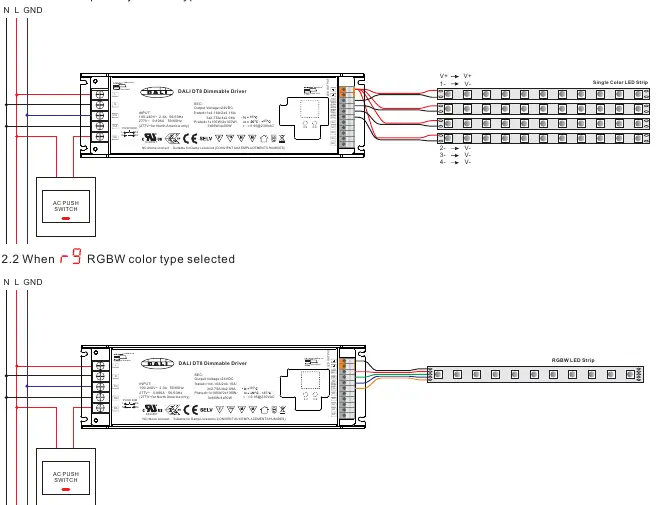
- DALI Master: Connect the DALI bus to the DA/DA terminals. Ensure the DALI master controller supports the specific color type commands (Primary N, RGBW, Tc, or XY) being used.
- AC Push Switch: Connect the AC push switch to the PUSH DIM input. This allows for manual ON/OFF and dimming control.
Operation
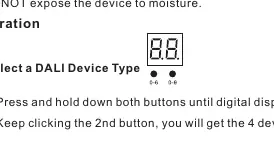
Setting DALI Device Type
- Press and hold both buttons until the digital display flashes.
- Click the 2nd button to cycle through the 4 device types.
- Press and hold both buttons again to confirm the selection.
Setting DALI Address
- Press and hold either button until the display flashes.
- Click buttons to set the address (00-63). The first button sets the 'tens' digit, the second button sets the 'units' digit.
- Press and hold either button to confirm.
Push Dimmer Mode
When connected to an AC push switch, the display shows 'PD'. Operation depends on the selected device type:
- Single Color: Click to switch ON/OFF. Press and hold to adjust intensity.
- RGBW/Tunable White: Click to switch ON/OFF. Press and hold to adjust intensity. Double-click to switch between brightness mode and color/temperature mode. Press and hold to change color or temperature.
Technical Specifications
- Input Voltage: 100-277V AC
- Output Power: Max 200W total
- Output Voltage: 12V DC or 24V DC
- Dimming Range: 0.1% - 100%
- Protection: Over current, over temperature (automatic recovery)
- IP Rating: IP20
Practical help
Common problems
DALI address not assigned
The display shows 'FF' by default. Assign an address between 00-63 to enable DALI control.
DALI master not controlling device
Ensure the DALI master controller supports the specific color type commands (e.g., DT8, RGBW, Tc) required for your setup.
W channel not turning on (XY coordinate mode)
The W channel only turns on when the coordinate point is in the area where R, G, and B colors mix. W intensity follows R, G, B intensity.
Before use
- Verify input voltage is 100-277V AC.
- Ensure power is disconnected before installation.
- Check that the DALI master supports DT8 commands.
- Confirm the LED strip voltage (12V or 24V) matches the driver output.
- Ensure the environment is dry (IP20 rating).
Specs in practice
- Push Dimmer Mode
- Allows manual control of lights using a standard AC push switch without a DALI master.
Images and diagrams
- Wiring diagrams show connections for DALI Bus (DA/DA) and AC Push Switch (PUSH DIM).
- Output terminals are labeled for specific LED types (1/R/WW, 2/G/CW, 3/B/WW, 4/W/CW).
Model compatibility
- Compatible with universal AC push switches.
- Requires DALI master that supports DT8 commands for advanced color control.
- Suitable for indoor LED lighting applications only.

Manual page author
Emily Carter
User documentation editor
Prepares concise manual descriptions and highlights the most useful setup, operation, and maintenance information for readers.