Lighting / Outdoor Lighting
User Manual for Tecnolite 200LQLEDY30MVN LED Outdoor Light
Quick guide for the Tecnolite 200LQLEDY30MVN LED outdoor floodlight. Includes installation steps, wiring instructions, safety precautions, and maintenance tips.
Quick answers from the manual
Quick answer
- The Tecnolite 200LQLEDY30MVN is an outdoor LED floodlight. Installation requires mounting with user-supplied anchors, connecting to a 100-240V power source, and ensuring a physical ground connection. p. 1
Key actions
- Install at least 0.5m away from combustible materials. p. 1
- Disconnect power before installation or maintenance. p. 1
First start
- Disconnect power, mount the fixture using appropriate anchors, connect wires (Line, Neutral, Ground), and restore power. p. 1
Maintenance and reset
- Clean the luminaire and its internal parts with a dry rag and check connections periodically. p. 1
Technical specifications
| Parameter | Value | Meaning | Pages |
|---|---|---|---|
| Voltage | 100-240V | Operating voltage range | p. 1 |
| Power | 200W | Power consumption | p. 1 |
Where to find it in the PDF
- Installation and Safety p. 1
- Warranty p. 2
Table of contents
Manual images
Click an image to enlargeQuick guide from the manual
This document provides essential installation and safety instructions for the Tecnolite 200LQLEDY30MVN LED outdoor light. Key requirements include maintaining a minimum distance of 0.50 meters from combustible materials and ensuring a physical ground connection. Always disconnect the power supply before performing any installation or maintenance work.
Technical Specifications
- Voltage: 100 V – 240 V ~ 50 Hz/60 Hz
- Power: 200 W
- Protection Rating: IP66 (Dust tight and protected against powerful water jets), IK05 (Impact protection)
- Current: 2 A - 0.83 A
Installation
The fixture must be mounted securely to a surface. Please note that anchors and screws are not included and must be selected based on the mounting surface type.
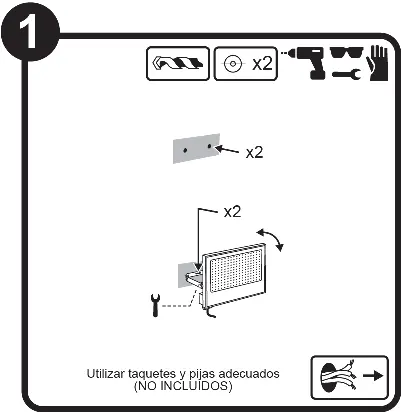
- Ensure the power supply is disconnected.
- Drill holes according to the bracket dimensions.
- Secure the fixture using appropriate anchors and screws.
- Adjust the angle of the light as needed.
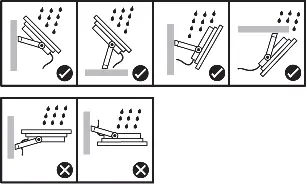
Important: Do not install the fixture facing upwards or in positions where water can accumulate in the housing, as this may damage the unit.
Wiring
The electrical connection must be performed by a qualified individual. The unit requires a three-wire connection:
- Line: Connect to the live wire.
- Neutral: Connect to the neutral wire.
- Ground: A physical ground connection is mandatory for safety.
Safety and Maintenance
To ensure the longevity of the product and safety of the user:
- Safety: Do not use the product with voltage levels exceeding the specified limits.
- Cleaning: Clean the fixture and its internal parts periodically using a dry rag.
- Maintenance: Regularly check all electrical connections to ensure they remain secure.
- Handling: The lamp and parts of the luminaire can become hot during operation; use gloves or allow the unit to cool before handling.
Manufacturer information
Tecnolite
Practical help
Common problems
Light does not turn on
Verify that the power supply is active and that all electrical connections (Line, Neutral, Ground) are secure.
Water ingress or damage
Ensure the fixture is not installed facing upwards or in a position where water can pool. Verify the installation angle.
Before use
- Verify the power supply is 100-240V.
- Ensure the mounting surface is stable and suitable for the weight of the fixture.
- Check that there are no combustible materials within 0.50 meters of the installation site.
- Acquire appropriate anchors and screws for your specific wall type (not included).
- Ensure you have the necessary tools for drilling and wiring.
Images and diagrams
- Step 1: Mounting the fixture using anchors and screws.
- Step 2: Wiring diagram showing Line, Neutral, and Ground connections.
- Installation orientation: Shows correct and incorrect angles to prevent water accumulation.
Model compatibility
- Requires a physical ground connection.
- Not suitable for constant operation with voltage exceeding the specified range.

Manual page author
Emily Carter
User documentation editor
Prepares concise manual descriptions and highlights the most useful setup, operation, and maintenance information for readers.