Tools / Air Compressors & Pneumatics
User Manual for Toolcraft 2-in-1 Laser Measuring Tape 2865714
Comprehensive user guide for the Toolcraft 2-in-1 Laser Measuring Tape (2865714). Includes instructions for laser measurement modes, tape usage, battery charging, safety precautions, and troubleshooting.
Quick answers from the manual
Quick answer
- The Toolcraft 2-in-1 Laser Measuring Tape combines a 40m digital laser measure and a 5m physical tape measure. It supports distance, area, volume, and Pythagoras calculations. p. 4, 5
Key actions
- Charge battery p. 5
- Switch measurement mode p. 5
First start
- Charge the device fully before first use. p. 5
Problems and fixes
Device won't turn on
Restart or charge.
p. 6
Code 204
Calculation error, measure again.
p. 6Error codes
| Code | Meaning | Action | Pages |
|---|---|---|---|
| 204 | Trigonometric function calculation error | Measure correctly. | p. 6 |
Technical specifications
| Parameter | Value | Meaning | Pages |
|---|---|---|---|
| Laser Range | 0.35 – 40 m | Operating range of the laser. | p. 6 |
| Tape Range | 0 – 5 m | Physical tape length. | p. 6 |
Where to find it in the PDF
- Product Overview p. 5
- Technical Data p. 6
Table of contents
Quick guide from the manual
The Toolcraft 2-in-1 Laser Measuring Tape is a dual-function tool featuring a 40m digital laser measure and a 5m physical tape measure. Before first use, ensure the device is fully charged (2-3 hours). The device is intended for indoor use only. Always handle the device carefully, as impacts can damage the internal components. If the device fails to operate, check the battery level or restart the unit.
Product Overview
The device features a charging input cover, a units/reference point button, an on/off/measure button, a function (FUNC) button, a laser beam output, a tape measure with thumb lock, and a display. The display shows measurement results, battery status, and active modes.
Safety Instructions
- Laser Safety: The device uses a Class 2 laser. Never look directly into the laser beam or point it at people or animals. If the laser hits your eyes, close them immediately and move away.
- Electrical Safety: Do not use the metal tape measure near electrical fittings to avoid electric shock.
- Battery Safety: The Li-ion battery is built-in and non-replaceable. Do not damage the casing, short-circuit contacts, or throw the product into fire.
- Operating Environment: Use only indoors. Protect from extreme temperatures, moisture, and direct sunlight. Allow the device to reach room temperature before use if moved from a cold to a warm environment.
Operation
Charging: Open the charging input cover and connect the USB-C cable to a power adapter. Charging takes 2-3 hours. Do not charge via a computer USB port as the power supply may be insufficient.
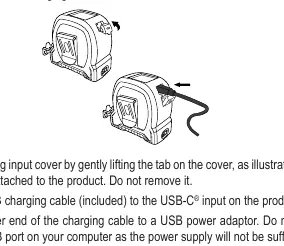
Turning On/Off: Press the measure button to turn the device on. To turn it off, press and hold the measure button for 5 seconds.
Using the Tape Measure
Pull out the tape to measure. Use the thumb lock to secure the tape at the desired length. Retract the tape slowly and carefully, guiding it with your hand to prevent cuts from the metal edges.
Using the Laser Measure
The device supports several modes, selectable via the FUNC button:
- Distance Measurement: Standard single distance measurement.
- Real-time Measurement: Continuously updates distance as you move the device.
- Area Function: Calculates area based on two measurements.
- Volume Function: Calculates volume based on three measurements.
- Pythagoras Functions: 2-point and 3-point modes for indirect height or width measurements.
Settings
Units: Press and hold the units button for 3 seconds to toggle between m, ft, in, and combinations.
Reference Point: Use the units button to switch the measurement reference point between the front and the back of the device.
Cleaning and Maintenance
Disconnect from power before cleaning. Use a lint-free, slightly moistened cloth. Do not use harsh chemicals or alcohol, and do not immerse the device in water.
Troubleshooting
If the device does not turn on, restart it or charge the battery. If the display shows dashes, hold the device steady, ensure you are within the rated range, or select a better target surface. Code 204 indicates a calculation error; repeat the measurement.
Technical Data
- Laser Range: 0.35 – 40 m
- Tape Range: 0 – 5 m
- Power Supply: 5 V/DC, 2 A (max. 10 W)
- Battery: Li-ion 3.7 V 300 mAh
- Operating Temperature: 0 to +40 °C
Practical help
Common problems
Device won't turn on
Restart the device or charge the battery. Check if shock protection triggered a shutdown.
All dashes shown on display
Hold the device steady, move the laser slowly, measure within the rated range, or select a better target surface.
Code 204 warning
Trigonometric calculation error. Ensure measurements are taken correctly.
Before use
- Charge the battery fully (2-3 hours).
- Ensure the device is at room temperature.
- Set the desired unit of measurement.
- Set the laser reference point (front or back).
Specs in practice
- Laser Class 2
- Safe for normal use, but do not stare into the beam.
- Operating Temp
- 0 to +40 °C; do not use outside this range.
Images and diagrams
- The device features a laser output, tape measure, function buttons, and a display.
- Reference point can be switched between the front and back of the device.
Model compatibility
- Indoor use only.
- Do not use metal tape near electrical fittings.

Manual page author
Emily Carter
User documentation editor
Prepares concise manual descriptions and highlights the most useful setup, operation, and maintenance information for readers.