Electronics / Networking
User Manual for Trendnet TI-IG219 Industrial PoE++ 2.5G Gigabit Injector
Quick guide for the Trendnet TI-IG219 Industrial PoE++ 2.5G Gigabit Injector. Includes installation steps, wiring instructions, and technical specifications.
Quick answers from the manual
Quick answer
- The TI-IG219 is an industrial PoE++ injector that provides up to 95W of power and 2.5G data speeds to connected devices. It requires a 48-57V DC power input. p. 1, 4
Key actions
- Connect the power supply to the 4-pin terminal block. p. 4
- Mount the device using the DIN-rail or wall mount kit. p. 3, 4
Technical specifications
| Parameter | Value | Meaning | Pages |
|---|---|---|---|
| Power Input | 48-57V DC | Required DC voltage for operation | p. 4 |
| PoE Power | 88-95W | Total power available for PoE devices | p. 4 |
| Operating Temperature | -40°C to 75°C | Allowed ambient temperature range | p. 1, 4 |
Where to find it in the PDF
- Product Overview and Features p. 1, 2
- Network Solution and Mounting p. 3
- Specifications p. 4
Table of contents
Manual images
Click an image to enlargeQuick Guide
The Trendnet TI-IG219 is an industrial-grade PoE++ injector designed to provide power and data to network devices. It supports high-speed 2.5G data transfer and delivers up to 95W of power. This device is built for harsh environments with an IP50-rated metal housing and a wide operating temperature range.
Product Overview
The device features a compact design suitable for industrial applications. Key components include:
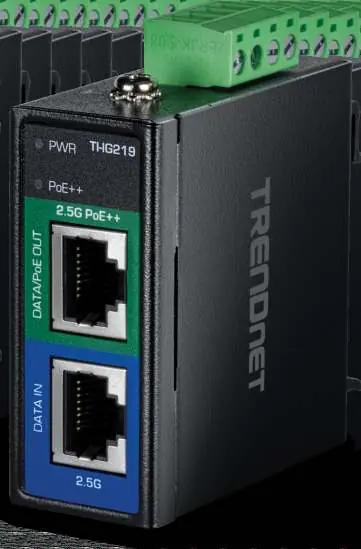
- Data/PoE Out Port: 2.5G port for connecting to PoE devices.
- Data In Port: 2.5G port for connecting to a non-PoE switch.
- Terminal Block: 4-pin connector for redundant power input.
- LED Indicators: Provide status for power and PoE connectivity.
Installation and Mounting
The TI-IG219 is designed for flexible installation in industrial settings.

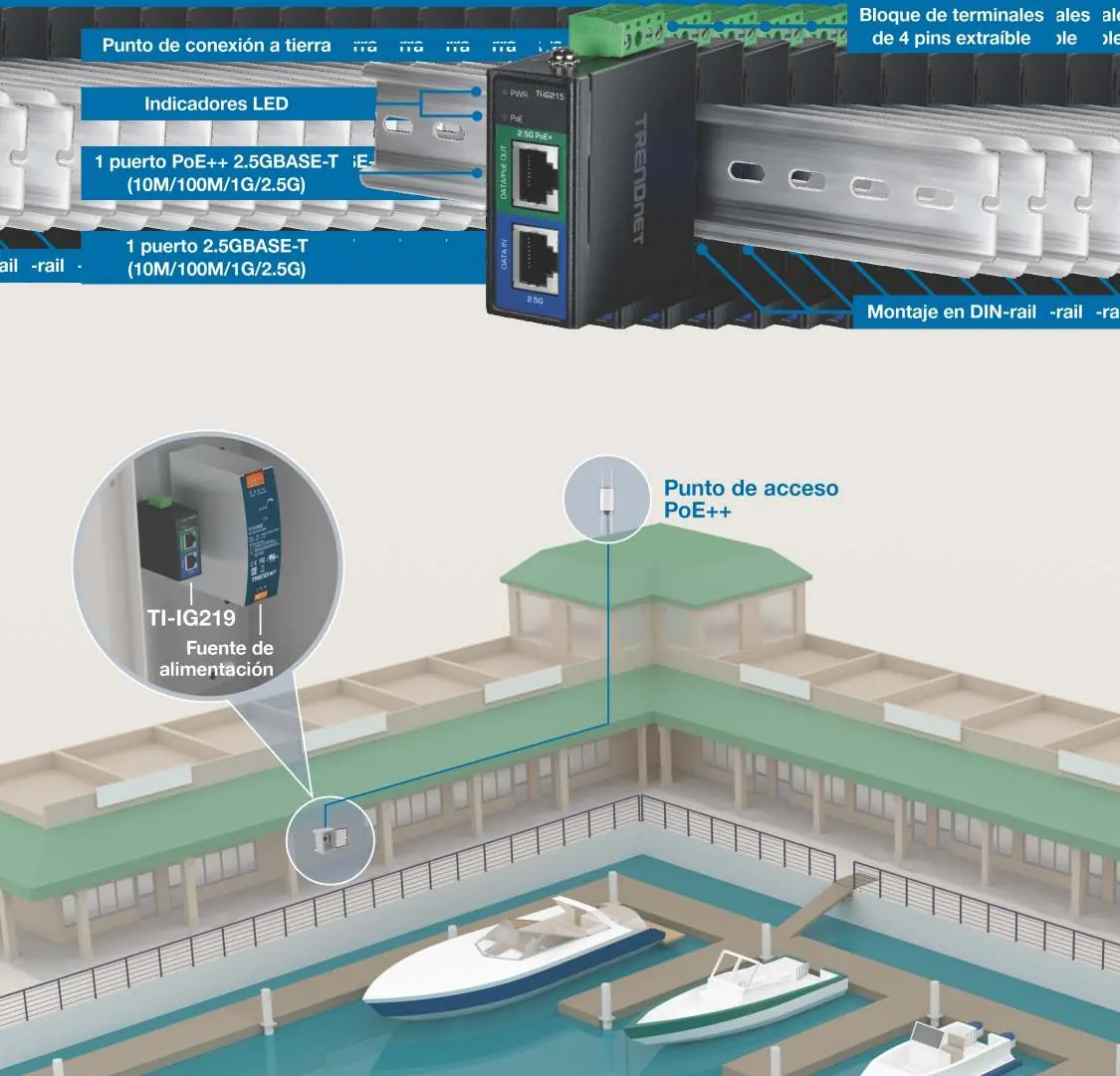
- DIN-Rail Mounting: Use the included DIN-rail kit to mount the device securely on a standard rail.
- Wall Mounting: The device can also be mounted on a wall using the provided accessories.
- Grounding: Ensure the device is properly connected to a grounding point to protect against electrical surges.
Wiring and Power
The injector requires an external power supply (sold separately, model TI-S15052) to operate.
- Power Input: Connect a 48-57V DC power source to the 4-pin removable terminal block.
- Wiring Specifications: Use wire with a cross-section of 0.34mm² to 2.5mm² (14-22 AWG). Strip the wire ends to 7-8 mm.
- Torque: Tighten terminal screws to 0.3Nm - 0.39 Nm.
Technical Specifications
- Standards: IEEE 802.3af, 802.3at, 802.3bt.
- PoE Power: 88-95W available.
- Operating Temperature: -40°C to 75°C (-40°F to 167°F).
- Dimensions: 60 x 58 x 26 mm.
- Weight: 134g.
Practical help
Common problems
Device does not power on
Verify that the 48-57V DC power source is correctly connected to the terminal block and that the power supply is functional.
No PoE output to connected device
Ensure the connected device is compatible with IEEE 802.3af/at/bt standards and that the cable length does not exceed 100 meters.
Before use
- Verify the power supply voltage is between 48V and 57V DC.
- Ensure the DIN-rail or wall mounting surface is stable.
- Check that the Ethernet cables are Cat5e or better for 2.5G performance.
- Confirm the operating environment is within the -40°C to 75°C range.
Images and diagrams
- The terminal block on top is used for redundant power input.
- The front panel clearly labels the Data In and Data/PoE Out ports.
Model compatibility
- Compatible with IEEE 802.3af (15.4W), 802.3at (30W), and 802.3bt (95W) devices.
- Requires an external power supply (e.g., TI-S15052).

Manual page author
Michael Turner
Technical manual editor
Reviews PDF manuals for structure, safety notes, and practical product details so readers can find the right information quickly.