Electronics / Networking
User Manual for Trendnet TI-G5062 Industrial Switch
Quick guide for the Trendnet TI-G5062 industrial switch. Includes installation, power connection, mounting instructions, and technical specifications.
Quick answers from the manual
Quick answer
- The TI-G5062 is an industrial switch with 4x 2.5G ports and 2x 10G SFP+ ports, supporting 9-60V DC redundant power and operating in temperatures from -40°C to 75°C. p. 1, 4
Key actions
- Mounting the switch p. 3, 4
- Connecting power p. 2, 4
Problems and fixes
Power failure
Check redundant power inputs; alarm relay triggers on failure.
p. 2, 3Technical specifications
| Parameter | Value | Meaning | Pages |
|---|---|---|---|
| Operating Temperature | -40° – 75°C | Extreme temperature range for industrial environments | p. 4 |
| Power Input | 9 - 60 V DC | Required DC voltage range | p. 4 |
| Switching Capacity | 60 Gbps | Total data throughput capacity | p. 4 |
Where to find it in the PDF
- Product Overview p. 1
- Features and Application p. 2
- Technical Specifications p. 4
Table of contents
Manual images
Click an image to enlargeQuick guide from the manual
The Trendnet TI-G5062 is an industrial-grade switch designed for harsh environments. It features 4 x 2.5G ports and 2 x 10G SFP+ ports. Key operational features include redundant power inputs, an alarm relay for power failure notification, and a rugged IP50-rated metal housing capable of operating in extreme temperatures ranging from -40°C to 75°C.
Device overview
The front panel includes:
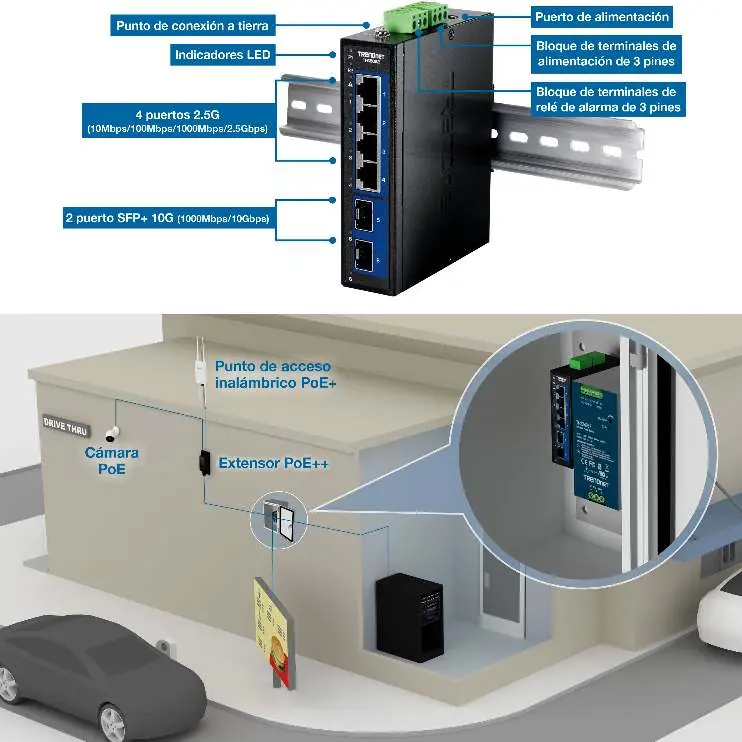
- 4 x 2.5G RJ-45 ports (10/100/1000Mbps/2.5Gbps).
- 2 x 10G SFP+ ports (1000Mbps/10Gbps).
- LED indicators for port status.
- Grounding point.
- Terminal blocks for power and alarm relay.
Installation
The device is designed for industrial deployment and supports two mounting methods:

- DIN-Rail Mounting: Use the included DIN-rail kit to attach the switch to a standard industrial rail.
- Wall Mounting: Use the included wall-mount kit to secure the device to a flat surface.
Power connection
The switch supports redundant power inputs to ensure network uptime:
- Input Voltage: 9 - 60V DC.
- Redundancy: Connect two independent power sources to the terminal blocks. If one power source fails, the switch automatically switches to the second source.
- Alarm Relay: The device features a relay output that triggers if a power supply failure is detected.
Technical specifications
- Switching Capacity: 60 Gbps.
- Operating Temperature: -40°C to 75°C (-40°F to 167°F).
- Housing: IP50-rated metal.
- Power Consumption: Max 8W.
- Dimensions: 120 x 98 x 30 mm.
- Weight: 410g.
Practical help
Common problems
Power failure alarm triggered
Check both redundant power inputs. The alarm relay activates when a power supply deficiency is detected.
Device not powering on
Verify that the input voltage is within the 9-60V DC range and that the terminal block wiring is secure.
Before use
- Ensure the power supply (9-60V DC) is compatible and available.
- Verify that the installation environment is within the -40°C to 75°C temperature range.
- Confirm that the DIN-rail or wall mounting surface is stable.
- Check that you have the correct SFP+ modules for your fiber network requirements.
Specs in practice
- Redundant Power
- Allows connection of two power sources; if one fails, the switch continues to operate using the other.
Images and diagrams
- The port layout diagram identifies the location of the 2.5G ports, 10G SFP+ ports, power terminal blocks, and the grounding point.
- The application diagram illustrates how the switch connects to PoE cameras and wireless access points in an industrial setting.
Model compatibility
- Compatible with TI-M6024 power supply.
- Supports Jumbo Frames up to 12KB.

Manual page author
David Miller
Documentation analyst
Organizes user manual content into clear summaries, with attention to model details, product context, and everyday usability.