Electronics / Security Cameras
User Manual for Uniview 0235C9BH Network Dome Camera
Quick guide for the Uniview 0235C9BH Network Dome Camera. Includes installation steps, waterproof cable requirements, app setup, and web interface configuration.
Table of contents
Manual images
Click an image to enlargeQuick guide from the manual
This document provides essential instructions for installing and configuring the Uniview 0235C9BH Network Dome Camera. It covers physical installation, waterproofing, network setup via the Guard Live app, and web interface access.
Waterproof requirements
Proper waterproofing is critical for outdoor installations to prevent device damage. Failure to follow these steps may void warranty or cause failure:
- Connect all necessary cables and cut off unused copper wires.
- Use insulation tape to insulate the connection part of each cable.
- Apply self-adhesive waterproof tape (supplied) to the connection part and cable ends. Ensure the tape is fully stretched during application.
- Install the supplied waterproof components to the network cable in sequence.
- Mount the rubber ring onto the network cable interface before connecting.
- Optionally, place cables into a waterproof junction box.
Packing list
Ensure the package contains the following items. Contact your dealer if anything is missing:
- Camera
- Power adapter
- Waterproof components (tape, plug)
- Screw components (screws, hex key)
- Mount accessories (drill template, bracket adapter, gloves)
- Bracket
- Product documents
Installation
Micro SD card
To use edge storage, install a Micro SD card:
- Use a screwdriver to remove the two screws on the card cover.
- Remove the cover and insert the Micro SD card into the slot.
- Replace the cover and tighten the screws. Ensure the sealing ring is in position.
- Format the card via the camera's web interface before use.
Wall mount
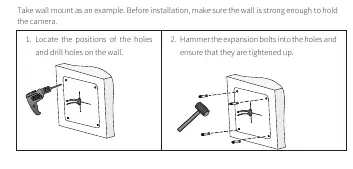
- Locate the positions of the holes and drill them on the wall.
- Hammer the expansion bolts into the holes and ensure they are tightened.
- Lead cables out from the bottom of the bracket and fix the bracket to the wall using four ST3.5 self-tapping screws.
- Adjust the antenna direction, align the camera gear with the bracket gear, and tighten the M4 screw.
Startup and app setup
Connect the power adapter to the mains and the camera. To add the camera to the Guard Live app:
- The camera supports 2.4GHz Wi-Fi networks only.
- Download the Guard Live app from the app store.
- Sign up for an account and log in.
- Connect your phone to the Wi-Fi network.
- Open the app, tap Add Device, scan the registration QR code, and follow the in-app instructions to connect.
Web interface access
You can access the camera directly via a web browser:
- Default IP address: 192.168.1.13
- Default username: admin
- Default password: 123456
- Note: DHCP is enabled by default. If your network assigns a different IP, use that address instead. Change the default password immediately upon first login for security.
Safety and security
- The device must be installed and maintained by a trained professional.
- Keep the cable connector away from water.
- Change the default password and set a strong password (at least 9 characters, including digits, letters, and special characters).
- Keep firmware up to date.
- Disable unused features like UPnP, SNMP, or Multicast if not required.
Manufacturer information
Uniview
Practical help
Common problems
Wi-Fi connection fails
Ensure you are using a 2.4GHz Wi-Fi network. Do not use the wired network interface during Wi-Fi setup.
Registration fails
Restore factory settings by holding the reset button for 10 seconds within 10 minutes of powering on the device.
Cannot access web interface
Check if your router's DHCP server assigned a different IP address than the default 192.168.1.13.
Before use
- Ensure the wall is strong enough to support the camera.
- Format the Micro SD card via the web interface before use.
- Waterproof all cable connections using self-adhesive tape.
- Install the rubber ring on the network interface.
- Download the Guard Live app.
- Change the default password (admin/123456) immediately.
Specs in practice
- Default Login
- admin / 123456
- Wi-Fi Frequency
- 2.4GHz only
Images and diagrams
- Waterproofing: Shows how to wrap cables with insulation tape and self-adhesive waterproof tape.
- Mounting: Shows drilling holes, inserting expansion bolts, and securing the bracket.
- Camera Mounting: Shows aligning the camera gear with the bracket and tightening the M4 screw.
Model compatibility
- Requires 2.4GHz Wi-Fi network.
- Micro SD card required for edge storage.

Manual page author
David Miller
Documentation analyst
Organizes user manual content into clear summaries, with attention to model details, product context, and everyday usability.