Electronics / Collaboration Devices
Quickstart Guide for WyreStorm SW-120-TX3-US/UK In-Wall Transmitter
Quickstart guide for the WyreStorm SW-120-TX3-US and SW-120-TX3-UK HDBaseT 3.0 in-wall transmitters. Includes wiring diagrams, connection instructions, troubleshooting, and technical specifications.
Quick answers from the manual
Quick answer
- The SW-120-TX3 is an in-wall HDBaseT 3.0 transmitter that supports 4K60Hz video, USB-C, and HDMI inputs. It requires a 20V 6A power supply (not included) and uses standard EIA568B HDBaseT cabling. p. 1
Key actions
- Run and terminate all wiring before connecting to the switcher. p. 3
First start
- Download the latest firmware and documentation from the product page before starting installation. p. 1
Problems and fixes
No or poor quality picture
Verify power, check cable connections, ensure HDBaseT cable follows EIA568B standard, and confirm 4K rating of HDMI cables.
p. 3Technical specifications
| Parameter | Value | Meaning | Pages |
|---|---|---|---|
| RS-232 Baud Rate | 115200 | Serial communication speed | p. 3 |
| Power Input | 20V 6A | Required power input | p. 2, 3 |
Where to find it in the PDF
- Quickstart Guide p. 1, 2, 3, 4
Table of contents
Manual images
Click an image to enlargeQuick Guide
The WyreStorm SW-120-TX3 is an in-wall HDBaseT 3.0 transmitter designed to extend 4K60Hz video, audio, and control signals. Before starting installation, ensure all wiring is run and terminated. WyreStorm recommends using pre-terminated HDMI and USB cables to ensure optimal performance. Note that while the device supports CEC, compatibility with all CEC communication forms is not guaranteed.
In the Box
- 1x SW-120-TX3-US or SW-120-TX3-UK In-Wall Transmitter
- 1x 1.8m USB2.0 Type-B to Type-A cable
- 1x 2m USB-C to USB-C Cable with Locking Connector (5Gbps)
- 1x 3-pin Terminal Block
- 1x 2-pin Terminal Block
- 1x Wall Plate (2-gang US, US model only)
- 4x Mounting Screws
- 1x Quickstart Guide
Device Overview
Front Panel: Features HDMI Input, USB-C Input, Source LED, Link LED, Power LED, Input Select button, Display Trigger button, Audio Line In (3.5mm), and USB Host (Type B).
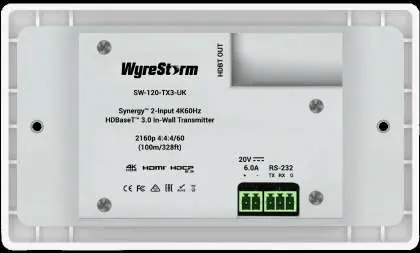
Rear Panel: Features HDBT Output (RJ-45), RS-232 (3-pin Phoenix), and Power Input (2-pin Phoenix).
Wiring and Connections
Wiring Guidelines: Avoid patch panels, wall plates, or cable extenders if possible, as these can limit signal performance. Ensure HDBaseT cables are terminated following the EIA568B standard. If using the USB-C connection for audio/video, verify the cable supports this functionality.
RS-232 Wiring: The unit uses a 3-pin RS-232 connection with no hardware flow control. Pin 1 is TX (Transmit), Pin 2 is RX (Receive), and Pin 3 is Ground. Ensure the connected device's pinout matches this configuration.
Power Wiring: The unit uses a 2-pin Terminal Connector for power. Pin 1 is Positive (+), and Pin 2 is Negative (-). A 20V 6A power supply is required (not included).
Troubleshooting
No or Poor Quality Picture: Verify power is supplied to both the transmitter and receiver. Check that all HDMI, USB, and HDBaseT connections are secure. Ensure the HDBaseT cable is terminated to the EIA568B standard. If transmitting 4K, confirm that HDMI cables are 4K rated and that the output resolution is supported.
No or Intermittent Device Control: Verify that RS-232 cables are properly terminated according to the wiring section. Use a cable tester to verify functionality if issues persist.
Practical help
Common problems
No or poor quality picture (snow/noise)
Check power supply, ensure cables are not loose, verify HDBaseT cable termination (EIA568B), and confirm HDMI cables are 4K rated.
No or intermittent 3rd party device control
Verify RS-232 cable termination and pinout configuration (Pin 1 TX, Pin 2 RX, Pin 3 Ground).
Before use
- Download latest firmware and documentation from the WyreStorm product page.
- Run and terminate all wiring before making connections.
- Use pre-terminated HDMI and USB cables.
- Verify USB-C cable supports audio/video functionality.
- Ensure HDBaseT cable is terminated to EIA568B standard.
Images and diagrams
- Basic Wiring Diagram: Illustrates connections between the transmitter, receiver, display, and control devices.
- RS-232 Pinout: Shows connection mapping between the WyreStorm connector and 3rd party devices.
- Power Connector: Shows polarity for the 2-pin power input.
Model compatibility
- Supports 4K60Hz HDBaseT 3.0.
- USB-C input supports alt-mode and device charging.
- CEC support is not guaranteed for all devices.

Manual page author
Emily Carter
User documentation editor
Prepares concise manual descriptions and highlights the most useful setup, operation, and maintenance information for readers.