Electronics / Monitors
Operation Manual for ZOOM MS-80IR+ IR Loader
Quick guide for the ZOOM MS-80IR+ IR Loader application, covering installation, IR data management, naming, and software settings.
Table of contents
Manual images
Jump to the sectionQuick guide from the manual
The IR Loader for MS-80IR+ is a software application designed to manage impulse response (IR) data on the ZOOM MS-80IR+ pedal. It allows users to import IR files from a computer, rename them, and delete them from the device.
Installation and connection
To use the application, download and install it from the official ZOOM website at zoomcorp.com/help/ms-80irplus. Once installed, connect the MS-80IR+ to your computer using a USB Type-C cable. Ensure the cable supports data transfer; if a faulty or non-data cable is used, the pedal display will show NO DATA SUPPORT.
Managing IR data
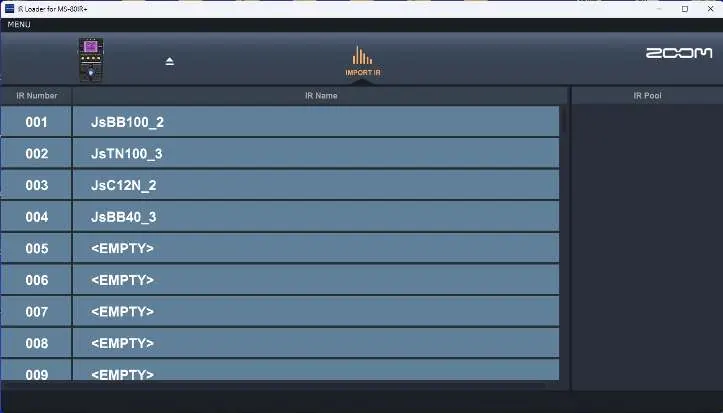
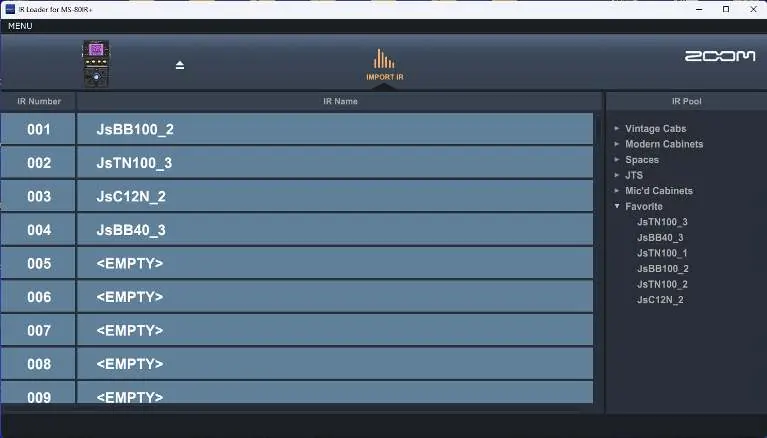
The application interface consists of the IR pool (where files are stored on the computer) and IR slots (where files are stored on the pedal). To import data:
- Open the folder containing your IR files.
- Drag and drop the desired IR files into the IR pool.
- Drag and drop the files from the IR pool into the specific IR slots on the pedal.
Supported format: WAV files with a sampling frequency between 44.1 kHz and 192 kHz.
Editing and deleting IR data
To rename an IR file, double-click the name in the IR slot and enter a new name. Names can be up to 20 characters long and support alphanumeric characters and specific symbols (! % & ' + , - . = _). To delete an IR file, right-click the entry in the IR slot and select Delete.
Settings and version information
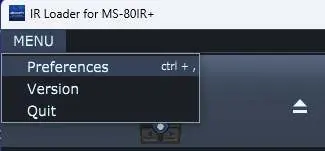
The MENU button provides access to application settings:
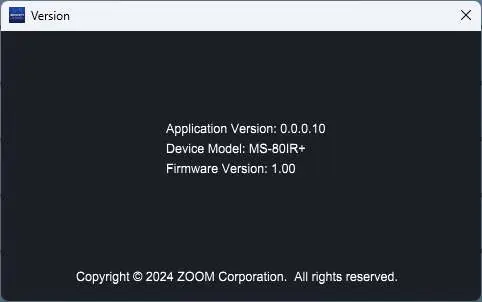
- Version: Displays the current application version, device model, and firmware version.
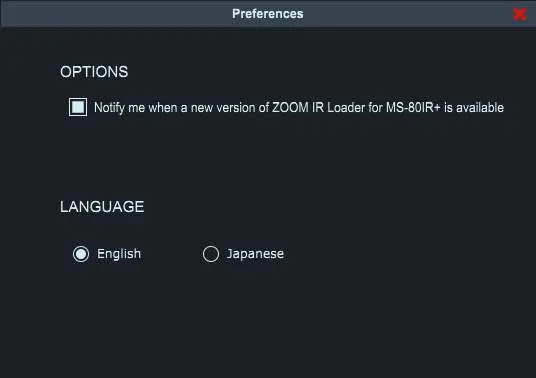
- Preferences: Allows you to toggle update notifications and change the application language between English and Japanese. Note that changing the language requires an application restart.
Official resources from the manual
Practical help
Common problems
NO DATA SUPPORT message on pedal display
The USB cable used does not support data transfer or is damaged. Replace with a high-quality USB data cable.
Cannot change language
After selecting a new language in Preferences, you must restart the application for the changes to take effect.
Before use
- Download and install the latest IR Loader software from zoomcorp.com/help/ms-80irplus
- Ensure you have a USB Type-C cable capable of data transfer
- Verify that your IR files are in WAV format (44.1–192 kHz)
- Check that the pedal is connected and recognized by the computer
Specs in practice
- Sampling Frequency
- Must be between 44.1 kHz and 192 kHz for successful loading.
- IR Name Limit
- Maximum of 20 characters allowed for file names.
Images and diagrams
- The interface shows the IR pool on the right and the pedal's IR slots on the left.
- Drag-and-drop functionality is used to move files from the computer folder to the pool, and from the pool to the pedal slots.
Model compatibility
- Compatible with Windows and Mac operating systems.
- Designed specifically for use with the ZOOM MS-80IR+ pedal.

Manual page author
Emily Carter
User documentation editor
Prepares concise manual descriptions and highlights the most useful setup, operation, and maintenance information for readers.