Music / Guitar Effects
NUX '63 Diamond Overdrive Pedal
Quick guide for the NUX '63 Diamond Overdrive pedal. Learn about controls, power requirements, battery installation, and technical specifications.
Table of contents
Quick guide from the manual
The NUX '63 Diamond Overdrive is an amp-in-a-box pedal from the Reissue Series, designed to deliver classic British invasion tones. It features an analog circuit with a true-bypass foot switch.
Product Interface
The pedal features the following controls and connections:
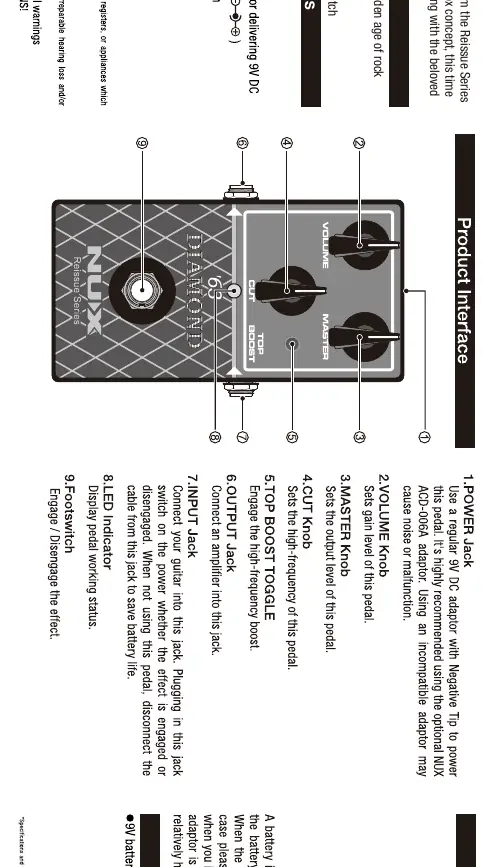
- Power Jack: Connect a 9V DC adapter (Negative Tip).
- Volume Knob: Sets the gain level of the pedal.
- Master Knob: Sets the output level of the pedal.
- Cut Knob: Sets the high-frequency of the pedal.
- Top Boost Toggle: Engages the high-frequency boost.
- Output Jack: Connect to your amplifier.
- Input Jack: Connect your guitar.
- LED Indicator: Displays the pedal's working status.
- Footswitch: Engages or disengages the effect.
Power and Battery
You can power the unit using a 9V battery or an external AC adapter (9V DC, regulated, minimum 300mA). It is recommended to use the optional NUX ACD-006A adapter.
To install the battery, connect the snap cord to the battery and insert it into the compartment as shown in the manual. When the battery runs down, the sound will change; replace it promptly. When not using the pedal, disconnect the cable from the input jack to save battery life.
Technical Specifications
- Input Impedance: 1M Ohms
- Output Impedance: 1k Ohms
- Power: 9V battery or external AC adapter (9V DC)
- Dimensions: 121mm (L) x 77mm (W) x 48mm (D)
- Weight: 230g
Safety Information
Do not place the unit near heat sources such as radiators or heaters. Do not expose the unit to rain or moisture to reduce the risk of fire or electric shock. Refer all servicing to qualified service personnel.
Practical help
Common problems
Sound changes or degrades
The battery is likely running low. Replace the battery with a new one.
Pedal does not turn on
Check the power supply connection or replace the 9V battery.
Before use
- Ensure you have a 9V DC power adapter (Negative Tip) or a fresh 9V battery.
- Connect your guitar to the Input jack.
- Connect your amplifier to the Output jack.
- Ensure the pedal is disengaged (LED off) before connecting cables to save battery life.
Specs in practice
- Input Impedance (1M Ohms)
- Standard impedance for guitar pickups to ensure clear signal transfer.
Images and diagrams
- The interface diagram shows the layout of the knobs (Volume, Master, Cut), the Top Boost toggle, and the input/output jacks.
- The footswitch is located at the bottom for easy engagement.
Model compatibility
- Recommended power adapter: NUX ACD-006A.
- Requires 9V DC power supply with Negative Tip.

Manual page author
Emily Carter
User documentation editor
Prepares concise manual descriptions and highlights the most useful setup, operation, and maintenance information for readers.